This game is our final project for Harvard CS50x. It's a simple 2D game written in Python3 language. To develop our game Pygame module has mostly been used.
P.S. We used Visual Studio Code source-code text editor during the whole process. It may not work on cloud-based online IDEs, at least it didn't on CS50 IDE.
-
There are 2 tanks spawning on each opposite corner. Tanks can be directed by using WASD and arrow keys. Each tank can shoot maximum 3 shells in a row. (Tutorial page for further explanations is available in the game menu)
Tanks are written in different class named Tank.py. This class also includes a bullet class that each tank has its own bullet objects.
-
If your tank hits wall, it gets stuck, cannot move forward or backward, can only rotate. Corresponding key will respawn you on your first spawn location whenever you get stuck.
-
Each round there will be a different maze and a different background displayed on the screen by using random module.
The number of mazes and background pictures could be increased later on.
-
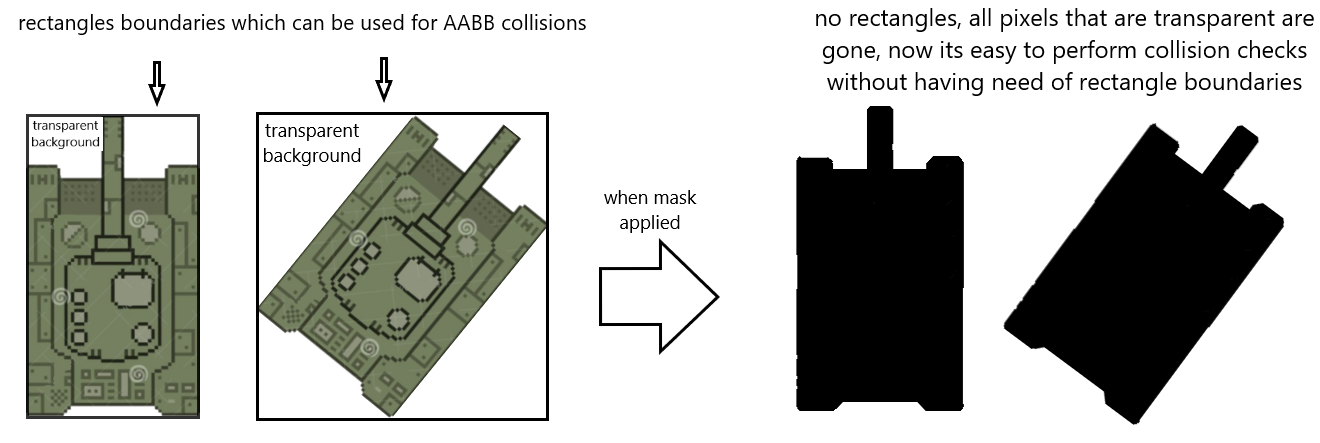
Collision detection algorithm in this game is a bit different than AABB collisions. Pygame brings you the ability to convert images into masks.
-
Mask indeed, is a surface that is drained of its transparent background from its original image. This ability helps you check if non-geometrical object collides with another non-geometrical shape in contrast with AABB (rectangle) collision.
-
Unfortunately, mask collisions would not be useful if you are willing to get collision coordinates. Accordingly, since we applied mask collisions between maze walls and bullets, bullets cannot bounce back, bullets hitting walls get depleted.
Mazes are simply made of walls and transparent background. When we load maze image onto the display screen then apply mask, other objects which also have their own masks could be checked if they collide with maze walls or not.
Simply, masks can be described as below:
- Since we calculate the speed of tanks on axis (dx,dy) by using sin() and cos() methods, and pixels on screen are counted one by one (not half by half or by other decimals), sometimes dx and dy are rounded to nearest integer which looks alike buggy in movements.
- We performed mask collisions. Thus bullets cannot bounce back. (That's what we intended at the very beginning).
- Since everytime mask collision checks are performed this will cause CPU to work more, FPS to drop. (Disadvantage of using masks, contrary to AABB )
- If 2 or more sounds start playing successively, only 1 sound happens to be heard. (sound bug of pygame)
- We are having resolution issues as it looks buggy when we open .exe file on other devices. We both had no problem at first but others suffered from resolution distortion. However, 1366x768 could be proper resolution if having such issues.
The distrubiton code will be available above. The game has a lot to do of course. More features of pygame could be learned then applied on game in convenience.
- Python 3.7.7 and above
- Pygame module
- Random, math, zipfile, io modules
To install pygame module in your computer, type those below in command line:
python3 -m pip install -U pygame --user
Or more simply:
pip install pygame