
Jet is a tiny, dependency-free, fixed-function 3D rasteriser written in modern C++17. It is designed to run on low-performance embedded hardware with limited memory such as the ESP32, STM32 and similar embedded MCUs, yet it is portable enough to run on a desktop PC, Raspberry Pi, or anything else.
Jet runs entirely in software using fast, integer-only arithmetic. It exclusively uses 16-bit RGB565 color natively for fast output to 565 displays such as the ST7796, ILI9488 and other similar SPI displays.
On an ESP32 S3, it is capable of rendering approxiamtely 25000 triangles/second (flat shaded), or a little over 400 on-screen triangles (after culling) at 60fps at 480x320, or 800 at 30fps which puts it somewhere between the Sega 32X and Sega Saturn in terms of performance at that resolution.
Show off your projects, chat with other users or ask for help and advice using Jet on the official Discord server!
A demonstration of a Wipeout-style game built on Jet, running on an ESP32-S3 at 60 FPS (interlaced field-buffer mode, software-rendered, no GPU):
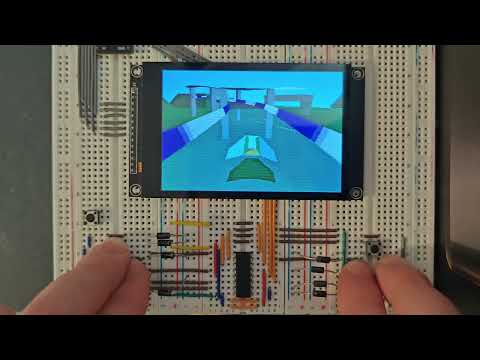

Jet is opinionated. Its sweet spot is:
- Stylised / retro 3D - flat-shaded, gouraud-shaded or affine-textured geometry, RGB565 framebuffers, the look of late-90s console / arcade 3D.
- Hard real-time, fixed budget - every feature is a compile-time switch in
JetConfig.hpp, so you only pay (in flash, RAM and CPU) for what you actually use. Disable Z-buffering, perspective-correct texturing or per-pixel lighting and the code for them simply isn't compiled in. - Tiny memory footprints - fixed-point math throughout the hot path, an optional half-width framebuffer mode, optional interlaced field-buffer mode for 60 Hz on parts that can't sustain a full progressive frame, and an optional checkerboard reconstruction mode for desktop.
- Predictable behaviour - no allocations on the hot path, no virtual dispatch in the rasteriser, no hidden globals. The same scene renders the same way on every platform.
If you want PBR, real-time global illumination, mesh shaders or 4K then this is not the engine for you. If you want to put a smooth, lit, textured 3D scene on a 320×240 LCD attached to a microcontroller, or to render a low-poly software-rasterised aesthetic at silly framerates on a desktop, Jet is built for exactly that.
Most of these are individually toggleable via JetConfig.hpp (see
src/JetConfig.example.hpp for the full list and
documentation):
- Triangle and quad meshes with per-face material assignment.
- Flat, Gouraud, Phong and wireframe shading modes (per material).
- Affine and perspective-correct texture mapping; optional bilinear filtering.
- RGB565 colour throughout (16-bit framebuffer, native to most embedded displays).
- Optional Z-buffering, or painter's-algorithm sorting (per-object and/or per-triangle) when memory is tighter than CPU.
- Backface / frontface culling, depth bias for decals/shadows, per-object blend modes (replace, add, subtract, multiply, average, XOR).
- Screen-door alpha and noise-based dithering for cheap transparency.
- Per-object distance-based fade in / fade out (LOD pop reduction) and scene-wide depth fog.
- Interlaced or Checkerboard rendering (with optional reconstruction)
WATER_REFLECTshading mode — animated screen-space water surface. Reflects the background sky gradient about a camera-pitch-correct waterline, with per-material ripple amplitude (specular) and vertical bias (waterYBias). Blended toward a flat tint bymaterial->alpha.ADDITIVEshading mode — saturating-add blend (src × alpha + dst). Fully emissive; intended for neon signs, lamp coronas, explosion halos, and faked dynamic lights.SSR_FIELD_REFLECT— whenFIELD_BUFFERSis active,WATER_REFLECTsamples mirror pixels from the previous committed field buffer so reflections are never depth-order dependent and never show render-order artefacts across parallel rendering bands.- Perspective-correct Phong normal interpolation (complements the existing perspective-correct UV path).
- Ambient + directional lights with FLAT / GOURAUD / PHONG shading.
- Optional
Z_BRIGHTNESScheap depth darkening for engines without a real light rig.
- "Free" effects (no extra buffer): CRT scanlines, cell-shading.
- Buffered effects (large-RAM targets): FXAA, bloom, motion blur, chromatic aberration, pixelation.
Primitives::create*helpers for cube / sphere / cylinder / capsule / pyramid / grid / plane / quad / billboard.- Minimal Wavefront
.objloader. - Optional screen-space picking (compile-time bounded; zero cost when set to 0). Returns the closest hit object, triangle index, depth and snapped pixel coordinate.
- Animated palette textures —
Texture::advancePalette(dt, fps)cycles the palette offset bydt × fpsentries per call; no-op whenpaletteSizeis 0. - A small custom shader entry point if you need to step outside the fixed-function path.
Sprite2D— a lightweight composited 2D sprite drawn over the scene afterrender(). Supports textured or solid-colour fills, colour-key transparency, optional alpha blend, additive blend, integer upscaling, andzOrder-based draw order. OnHALF_WIDTH_BUFFERSbuilds sprites are composited at full output resolution during display scanout.
ParticleSystem— a fixed-pool (no-heap) particle system rendered directly through the rasteriser afterscene->render(). Ships with a spark emitter (impact sparks with white → blue lifecycle) and a water-splash emitter (short-lived foam-to-blue spray). Distance LOD culls particles that are too far from the camera; emitter count and lifetime are tunable.
LensFlare— an n-element sprite chain that projects a directional light source to screen space, optionally queries a pick slot for sun occlusion testing, and repositions flare elements along the sun → screen-centre axis each frame. Fade speed, per-element axis offset (axisT), base alpha, blend mode and integer scale are all configurable. Works without picking (MAX_PICK_QUERIES = 0), in which case the sun is treated as unobstructed.
Jet is a library — it owns no window, display driver, or main loop.
Add it as a CMake subdirectory or ESP-IDF component, provide a
JetConfig.hpp on your include path (copy and customise
src/JetConfig.example.hpp), then call scene->render() once per frame.
For ESP-IDF, depend on it as you would any other component:
# main/idf_component.yml
dependencies:
  jet: "*"
…and provide a JetConfig.hpp next to your application.
Jet itself owns no window, no display driver and no main loop - it just
fills a framebuffer you give it. The host code below is the smallest
useful program: allocate a colour and depth buffer, build a scene with a
camera, a light and a cube, then call scene->render() once per frame.
#include "Jet.hpp"
using namespace Renderer;

// 320x240 RGB565 colour buffer + matching Z-buffer.
constexpr int W = 320, H = 240;
uint16_t color[W * H];
uint16_t depth[ZBUFFER_STRIDE(W) * H];

int main() {
    Scene  scene(color, depth, W, H);
    scene.setBackcolor(0x0000);          // RGB565 clear colour (black)
    scene.setClearBuffer(true);

    Camera camera;
    camera.setPosition(0, 0, -500);      // world units
    camera.setFOV(75, W);
    camera.nearPlane = 16;
    camera.farPlane  = 8192;
    scene.setCamera(&camera);

    DirectionalLight sun(Vector3{45, 35, 0}, Color{255, 245, 220}, 220);
    AmbientLight     amb(Color{40, 48, 64});
    scene.setDirectionalLight(&sun);
    scene.setAmbientLight(&amb);

    Material red(0xF800);                // RGB565: bright red
    red.shadingMode = ShadingMode::GOURAUD;

    Object* cube = Primitives::createCube(200, 200, 200, &red);
    cube->setPosition(0, 0, 200);
    scene.addObject(cube);

    // Per-frame: rotate, render, push the buffer to your display.
    for (;;) {
        cube->rotate(0, 1, 0);           // 1 degree per frame around Y
        scene.render();                  // colour buffer now contains the frame
        // pushToDisplay(color, W, H);   // <-- you provide this
    }
}
There is no Jet-side main(), no platform glue, no event pump. Whatever
talks to your display (SPI, parallel RGB, DMA, SDL streaming texture,
fbdev, …) is yours to provide; Jet stops at the framebuffer.
Full API reference is generated from the inline Doxygen comments in
src/ and is published via GitHub Pages at:
To build the docs locally (requires doxygen and optionally graphviz):
cd components/Jet/src
doxygen Doxyfile
# output: components/Jet/src/docs/html/index.html
The repository is configured to publish the same Doxygen output to GitHub Pages automatically on every push to the default branch - the hosted version at the link above always matches the latest committed sources.
Jet is dual-licensed.
Jet is distributed under the GNU Affero General Public License version 3,
or (at your option) any later version. The full text is in LICENSE.
You are free to use, study, modify and redistribute Jet under the terms of the AGPL. In short: anyone you distribute a binary to (including users who interact with it over a network) is entitled to the complete corresponding source code of the application that links against Jet, under the AGPL. This is a feature, not a bug. It is what keeps Jet (and improvements to Jet) free for everyone.
If you're hobbyist, an academic, an open-source project, or a company that ships your source code anyway, you almost certainly want this licence and you do not need to talk to us.
If you want to ship a closed-source product that links against Jet - i.e. you cannot or do not wish to release the source of your application under the AGPL - a commercial licence is available from CubeCoders. The commercial licence removes the AGPL's source-disclosure requirement for your product while leaving the upstream Jet codebase itself unaffected.
Commercial licensing: https://cubecoders.com/jet
We deliberately keep the open-source licence strong (AGPL, not LGPL or MIT) precisely so that the commercial licence is meaningful. Revenue from commercial licences is what funds continued development of the open-source version; if you benefit commercially from Jet without releasing your source, please buy a licence. It is the single most direct way to support the project.
Contributions are welcome - bug reports, fixes, new platforms, new examples, documentation improvements, all of it. Please open an issue or pull request on the official repository.
Before your first contribution, please read CONTRIBUTING.md. Because Jet is dual-licensed (AGPL + commercial), every contributor must agree to the Contributor Licence Agreement (CLA) documented there, which explicitly authorises CubeCoders to relicense contributions under the commercial Jet licence as well as the upstream AGPL version.
Jet is a CubeCoders project.