

QMapShack is a free, open-source desktop application for planning and analysing GPS tracks, routes, and waypoints. It supports vector, raster, and online maps, digital elevation models, and multiple routing engines. QMapShack is the successor to QLandkarteGT.
Full documentation: QMapShack Wiki
- Maps — Garmin vector maps (
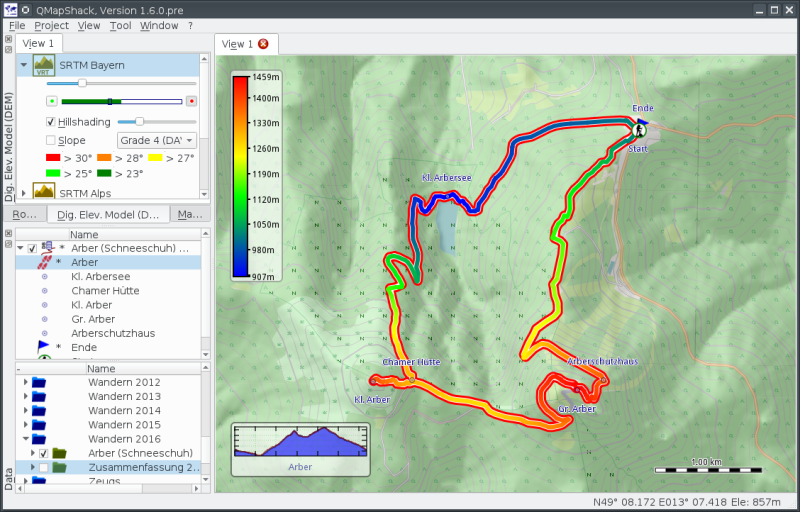
.img,.jnx), GDAL raster maps (GeoTIFF, OziExplorer, …), and online maps via TMS/WMTS. Multiple maps can be displayed simultaneously, reprojected on-the-fly. - Elevation data — Digital elevation models (DEM) independent from the base map, with hillshading and slope colouring.
- Tracks & routes — Full-featured track editor with unlimited undo/redo; cut, copy, combine, reverse; rich filter set for smoothing, resampling, speed, elevation, and timestamps.
- Routing — Offline routing via Routino; offline and online routing via BRouter (local process or HTTP API); vector/track snapping for precise alignment.
- Waypoints & areas — Create, edit, and organise waypoints, points of interest, and area overlays.
- Database — Project-oriented data model with persistent database storage, diary support, and structured folder organisation.
- GPS devices — Read/write support for modern Garmin and TwoNav devices; project-oriented synchronisation.
- Analysis — Track profile graphs, elevation, speed, slope, and heart rate analysis; realtime data display.
- Interface — Multi-canvas workspace; available in English, German, French, Spanish, Czech, Italian, Dutch, Catalan, and Russian.
Windows — 64-bit installer available on the releases page.
macOS — Binary bundle (Intel, macOS 14 Sonoma or later) on the releases page.
Linux — distribution packages:
| Distribution | Package |
|---|---|
| Debian | packages.debian.org |
| Ubuntu | packages.ubuntu.com |
| openSUSE | software.opensuse.org |
| Arch Linux | archlinux.org / AUR (dev) |
| Other (deb, rpm, …) | pkgs.org |
Linux — AppImages for Fedora, openSUSE, and Ubuntu are available from the QMapShack AppImage project. See the AppImage wiki page for details.
| Library | Minimum version | Purpose |
|---|---|---|
| Qt6 | 6.8 | Core, Widgets, Network, SQL, PrintSupport, WebEngineWidgets |
| GDAL | 3.0.0 | Map and raster data I/O |
| PROJ | 9.1.0 | Coordinate reference system transformations |
| Routino | 3.1 | Offline routing |
| QuaZip | 1.x (Qt6 build) | ZIP archive support |
| CMake | 3.20 | Build system |
| C++20 compiler | — | GCC ≥ 10, Clang ≥ 12, MSVC 2019 |
Install dependencies via your distribution's package manager and make sure the development packages (-dev / -devel) are included. On Linux, device support additionally requires DBus and UDisk2.
Distro-specific setup guides are on the wiki: Ubuntu 24.04 · Ubuntu 22.04 · Fedora · macOS · Windows
git clone https://github.com/Maproom/qmapshack.git QMapShack
cd QMapShack && git checkout dev && cd ..
mkdir build_QMapShack && cd build_QMapShack
cmake ../QMapShack
cmake --build . --target qmapshack -j$(nproc)
sudo cmake --install .
Use ccmake . or cmake-gui . in the build directory to review optional build settings before compiling.
Updating:
cd QMapShack && git pull
cd ../build_QMapShack && cmake --build . --target qmapshack -j$(nproc)
macOS
The macOS build uses Homebrew (recommended) or MacPorts. A scripted environment handles all dependencies.
mkdir ~/QMSBuild && cd ~/QMSBuild
git clone https://github.com/Maproom/qmapshack.git
# Review settings:
vi qmapshack/MacOSX/config.sh
# Build everything:
sh qmapshack/MacOSX/build-all.sh | tee log.txt
Finished app bundles appear in the release/ subdirectory. See MacOSX/README.md for the full guide.
Windows
Windows builds use MSVC 2019 (64-bit). Build scripts and step-by-step instructions are in the msvc_64/ directory and on the wiki.
After installation, follow the Quick Start guide to set up maps, elevation data, and routing, then load your first GPX file.
Quick starts are also available in German, French, Spanish, and Russian.
- Bug reports & feature requests: GitHub Issues — please use the provided issue templates.
- Code contributions: Pull requests target the
devbranch. See the coding guideline and commit guide on the wiki. - Translations: See Add translations on the wiki.
- Documentation: Wiki contributions are welcome — see Developing Documentation.
QMapShack is free software released under the GNU General Public License v3.0 or later.