Repository navigation
Conversation




New module :plugins:libkeks. It holds the KEKS J-PAKE / ExtraData
handshake that a Dexcom ONE+ / G7 sensor needs before it sends glucose.
Nothing uses it yet; the driver module comes in a later commit.

Provenance: NightscoutFoundation/xDrip (GPL-3.0), pin commit
1e86d9a2a52577ed2c30fbf7b69d75fd56e6918f (tag 2026.07.15). The 24 Java
files were TRANSLATED to Kotlin, they are not a verbatim copy.
BouncyCastle and BigInteger are replaced by small Kotlin classes
(KeksUInt, KeksP256, KeksEcdsa, KeksDer), Lombok is gone, and random,
AES and logging are three expect/actual pairs. NOTICE lists every
change. Every file, the tests included, has an SPDX header with the
pin: GPL-3.0-only, or MIT for SHA256.kt, which keeps its MIT notice.

Targets: Android and JVM only. No iOS targets yet, because nothing on
iOS uses the module. commonMain has no project dependencies, no KSP and
no Metro.

:appshell adds every :plugins:* module to its commonMain. libkeks is a
library, not a feature plugin, and has no Apple variant, so it would
break every iOS build of :appshell and :ios:shell. It is now left out
through a small PLUGIN_LIBRARIES list.

How to check the translation: src/commonTest holds golden values
recorded from the original Java + BouncyCastle code at the pin,
including a full four digit pairing replayed message by message. The
same 46 tests run in :plugins:libkeks:jvmTest and
:plugins:libkeks:testAndroidHostTest (both are in the unit-tests CI
command), and all pass. These are unit tests only; no test on a real
sensor is claimed for this branch.

Co-Authored-By: Claude Opus 5.5 (1M context) <noreply@anthropic.com>
Groundwork for the Dexcom ONE+ / G7 source plugin, which comes in a
later commit. Nothing here changes behaviour for existing users.

core/data
- SourceSensor.DEXCOM_ONEPLUS_NATIVE("AAPS-DexcomOnePlus"), an own
  entry for readings from the native ONE+ / G7 plugin.
- It is in ADVANCED_FILTERING_SENSORS, like DEXCOM_G6 / DEXCOM_G7: the
  sensor filters internally, so SMB-always is allowed for it as for G7
  read through BYODA.
- Sources.DexcomOnePlus for user entries.

database
- GlucoseValue.SourceSensor.DEXCOM_ONEPLUS_NATIVE and
  UserEntry.Sources.DexcomOnePlus, with both converter directions.
- Both columns store the enum NAME (Converters.fromSourceSensor /
  fromSource), so a new entry needs no Room migration and no
  DATABASE_VERSION change. A test checks the stored name.

implementation
- UserEntryPresentationHelperImpl: icon and colour for DexcomOnePlus,
  the same as Dexcom.

core/interfaces
- NotificationId.CGM_STAGING_AUTO_PROMOTED, appended at the end (the
  system notification id is the ordinal).
- source/CgmWarmupStatus.kt and source/CgmSensorLifecycle.kt: warm-up
  and second-sensor (pre-soak) status that a BG source can publish
  without naming a vendor. CgmSensorStatusProvider also exposes
  stagingSettleRemainingMs, so the overview can show the countdown
  without its own copy of the settle rule. Only members that the
  plugin screens or the overview read are there.

Calibration cut-off
- Calibration.ignoreEntriesBefore(timestamp), default does nothing.
  A promoted pre-soak sensor gets a session that starts hours before the
  swap; without the cut, fingersticks paired with the retired sensor
  would be fitted onto the new one.
- LinearCalibrationPlugin stores the cut in a new non-exportable key
  calibration_entries_valid_from (CalibrationLongKey, 0 = no cut) and
  fits only entries from max(session start, cut), so a later
  SENSOR_CHANGE wins over an older cut. The cut only moves forward. A
  cut more than 5 minutes in the future is logged and ignored, and the
  cut is removed when the database is cleared. The plugin now extends
  PluginBaseWithPreferences to own the key. The calibration screen uses the same entries, so it shows the fit
  that is applied. When nothing calls it, the fit is unchanged.
- prefs-schema.txt gets the new key.

Tests: new cases in SourceSensorExtensionsTest, SourceSensorExtension-
Test, SourcesExtensionTest, ConvertersSourceSensorTest and
LinearCalibrationPluginTest (entries before the cut are left out, only
newer entries are fitted, no call = same query as before, the cut never
moves back, a later session start wins, a cut in the future is ignored,
a database reset removes the cut). The full unit-tests CI command
passes, and every touched module compiles for iosArm64, including
:ios:shell. No test on a real sensor is claimed for this branch.

Co-Authored-By: Claude Opus 5.5 (1M context) <noreply@anthropic.com>
New module :plugins:dexcom_oneplus. It talks to a Dexcom ONE+ / G7 sensor
over Bluetooth LE without the Dexcom app: scan, connect, KEKS (J-PAKE)
authentication through :plugins:libkeks, then the Control loop that asks
for glucose (EGV) and pulls missed readings (backfill). Nothing uses it
yet; the source plugin that feeds the loop comes in a later commit.

Packages (app.aaps.plugins.dexcomoneplus)
- root: the driver facade OnePlusCgmDriver, the real driver, the two
  driver slots (production and pre-soak sensor), logging, platform port.
- gatt, scan: GATT client and LE scanner. The Android scanner keeps a
  scan start budget (the OS silently drops scans above 5 starts in 30 s).
- session: KEKS auth, EGV and backfill sessions, reconnect cycle policy,
  MAC arbiter (one sensor, one owner), CPU lease (wake lock).
- parse: message encoders and decoders, including the display-only flag
  check that keeps a value echoed after a calibration away from the loop.
- identity, oem, reconnect, warmup: sensor identity and store, per-phone
  BLE defaults, retry policy, warm-up clock.

The reconnect and radio hardening is kept as it is: wake lock through
the pre-connect settle, scan quota, warm-up retry budget, INDICATE
before NOTIFY on Control, no HIGH connection priority (peer status 19),
blind connect and stale MAC rules, audio link logging, OEM profiles.

Provenance: parts are derived from xDrip (pin 1e86d9a2a5, tag
2026.07.15) and Juggluco (pin 5297da7c23, version 10.9.6, GPL-3.0-or-later).
NOTICE lists every derived file.

Left out on purpose
- iOS: Android is the only target. The protocol code stays in commonMain
  without Android imports, so iOS targets can be added later with an
  iosMain only. The module is in the PLUGIN_LIBRARIES list of :appshell
  because it has no Apple variant.
- Radio lease (back off while a pump is set up): nothing ever asked for
  it, so setRadioBackOff, setLowPower and the scan budget hold are gone.
- Sending a fingerstick calibration to the sensor (opcode 0x34): it
  writes something permanent into the sensor, so it has its own commit
  later in this series ("send fingerstick calibrations to the sensor").
  Reading the calibration state from glucose packets is here.

Notes
- AapsLock.withLock has no callsInPlace contract, so three places in
  OnePlusCgmDriverReal return their values from the lock block instead
  of assigning vals inside it.
- The wake lock tag is AndroidAPS::DexcomOnePlusAuth.
- There is no placeholder GATT client or auth that only throws: the
  driver always gets the real ones.
- Manifest: BLUETOOTH_CONNECT, and BLUETOOTH_SCAN with
  neverForLocation, the same as the app and the pump drivers. The old
  BLUETOOTH and BLUETOOTH_ADMIN are not declared: the app needs
  Android 12 or newer.
- Logs: a MAC shows only its last 5 characters and a sensor serial only
  its last 3. Key bytes are never logged, only their length. Lines
  written for every glucose packet (EGV, backfill sample, Control
  timeout, transmitter time, EGV request) are debug, not info.

Tests: 175 JUnit tests in testAndroidHostTest, including the commonTest
classes, which run there with Android as the only target. They are unit
tests only; no test on a real sensor is claimed for this branch.
RawPreferenceStoreScanTest gets a toDo entry for the small Android
adapter that opens the sensor store file. The file holds the sensor
identity and pairing key, one plain SharedPreferences file per sensor
slot. Moving it to the encrypted settings store is a follow-up, with a
migration from the old file.

Co-Authored-By: Claude Opus 5.5 (1M context) <noreply@anthropic.com>
…support

New BG source "Dexcom ONE+ / G7" (DexcomOnePlusPlugin, plugin key 446,
right after the Dexcom source). It runs the BLE driver of
:plugins:dexcom_oneplus inside AAPS, so no Dexcom app or xDrip is needed,
and hands each reading to the loop through insertCgmSourceData.

What the plugin does
- Ingest: readings are mapped to GV with SourceSensor.DEXCOM_ONEPLUS_NATIVE
  and the sensor slope as trend arrow. Readings are dropped while the
  sensor warms up, and duplicates are dropped (4 min window plus a
  sequence floor that survives a restart).
- Two sensor slots. Production feeds the loop. Staging pre-soaks the next
  sensor next to the one in use: its readings are only collected, never
  given to the loop. Promotion needs 12 h of soak and 6 valid readings,
  or, when the user asks for an early switch, a recent reading. An
  optional automatic switch (off by default) uses the same checks. On
  promotion the plugin calls Calibration.ignoreEntriesBefore, so
  fingersticks paired with the old sensor are not fitted to the new one.
  If that call throws, the switch is kept and the user is told.
- The plugin publishes warm-up and staging state through
  CgmWarmupProvider and CgmSensorStatusProvider, including
  stagingSettleRemainingMs. The 12 h settle rule stays in the plugin.
- A reconnect watchdog asks for the session again after 5 min down, and a
  connectedDevice foreground service keeps the Bluetooth session alive
  while a sensor is stored in either slot.
- Work runs only while the plugin is started. Its coroutine scope is made
  when work is first needed and cancelled in onStop, so nothing runs for
  a user who never enables the plugin. The warm-up status flow is set
  directly, with no collector, and all state flows have their empty
  values while the plugin is off. An automatic switch that has already
  started is not cut in half by a stop.
- Sensor age: a SENSOR_CHANGE therapy event is written when a sensor is
  started (if "Create sensor change" is on).

Three sensor change settings, normal user settings, on by default, in
the plugin's settings screen:
- Repair a missing sensor change: writes the missing event once per
  sensor, so the overview age is right.
- Use a sensor change you logged as the start: a manual sensor change
  from the last 24 h becomes the session start.
- Allow correcting the insertion date: adds an action on the Status
  screen that moves the sensor start.

Advanced filtering: DEXCOM_ONEPLUS_NATIVE is in
ADVANCED_FILTERING_SENSORS (previous commit), so it enables SMB-always
and SMB-after-carbs like G7 / BYODA. This is a dosing input.

Where the files are (plugins/source)
- androidMain: everything that imports the driver - plugin, host
  interface and its Android implementation, ingest, warm-up mapper and
  notification, session foreground service, BLE permission helper, the
  Start / Status / Warm-up screens and activities, the driver log screen
  (CgmDriverLogActivity, DriverLogReader) and the Metro member injectors.
  The driver is an androidMain dependency only.
- commonMain: ONE+ code that does not need the driver - staging rules,
  automatic switch rule, sensor start correction, sensor change anchor,
  warm-up countdown, the Cgm* compose parts and the preference keys.
  CgmWindow has an expect with android, ios and jvm actuals.
- Activities use Metro @Inject fields; no javax interop is needed.
- CgmSpacing: four sizes used only by these screens (content width,
  list row height, warm-up ring min and max).
- Manifest: 4 activities, the service (connectedDevice) and
  FOREGROUND_SERVICE_CONNECTED_DEVICE.
- 166 English strings under one comment block.

Not in this commit
- The temp basal guard and sending a fingerstick calibration to the
  sensor (with the Status screen calibration card): both change dosing
  inputs, so each has its own commit later in this series.
- iOS host: the driver has no iOS target yet, so nothing here is
  contributed on iOS.
- The driver log screen shows the ONE+ driver only, so it has no filter.

Other changes
- Golden lists: ContributedPluginsTest gets 446, prefs-schema.txt gets
  the 8 new keys.

Tests: 172 tests for this code in :plugins:source:testAndroidHostTest:
ingest and dedup, staging rules and promotion order, automatic switch,
sensor age repair, insertion date, sensor change anchor, warm-up
mapping and countdown, the settle countdown, the Start screen, string
checks, and the plugin lifetime (nothing runs before onStart or after
onStop, a database write still waiting is cancelled by onStop, the flows
answer while the plugin is off). These are unit tests only; no test on a
real sensor or phone is claimed for this branch.

Co-Authored-By: Claude Opus 5.5 (1M context) <noreply@anthropic.com>
A sensor that warms up, or a second sensor that warms up next to the one
in use, could only be seen in the plugin's own screen. The Overview status
card now shows two more rows, right below the sensor row. Both come from
the generic CgmWarmupProvider / CgmSensorStatusProvider interfaces, so no
vendor is named in the UI. For every other BG source both rows are null
and the card is unchanged.

Warm-up row
- Minutes left and a bar that fills up. The time left comes from the
  wall-clock end time when the source gives one. The stored countdown is
  only used without it, because it goes stale between two radio windows.
- Minutes are rounded up, so it never reads "0 min" while warming. With no
  time known it reads "Waiting".
- A connection phase without a warm-up end time ahead is a radio
  reconnect, not a warm-up, so no row is shown for it. A reconnect during
  the warm-up keeps the end time and keeps the row.

Second sensor row ("New sensor")
- "Warming up", then "Ready in n h" while it settles, then "Ready to
  switch". The hours come from stagingSettleRemainingMs, rounded up. The
  rule for when a sensor may be used stays in the source; the UI has no
  copy of it. With no time left but not yet ready it reads "Waiting for
  readings", never "ready".
- The level column shows the valid readings of the new sensor, the only
  sign that a sensor whose values do not go to the loop is working.
- A Switch button only when the source says READY and commands are
  allowed. These two checks are in the UI only; the source checks its
  own rules again. It asks for confirmation, calls
  promoteStagingToProduction(allowEarly = false) off the main thread, and
  shows the result in a dialog. Each PromotionResult and each refusal
  reason has its own text, including OkBoundFailed (old calibrations could
  not be set aside) and OkFollowUpFailed (connection not started / sensor
  in use could not be read back). An exception is logged and the user is
  told to check which sensor is in use. A second tap while a switch runs
  does nothing. An early switch is not offered here; it stays on the
  source's own screen with its warning.

Refresh
- A 10 s tick, only while the card is on screen, rebuilds just these two
  rows from the source's StateFlows (no database read). It does nothing
  while no source reports either row and no such row is shown, and it
  removes a row on the next tick once the source stops reporting it.

StatusViewModel gets an AAPSLogger. 19 English strings in ui, with
comments where there are placeholders.

Tests (androidHostTest): 20 new StatusViewModelTest cases (end time wins
over the stored countdown, stored countdown without end time, rounding,
reconnect is not a warm-up, row disappears after warm-up, hour ceiling, waiting for readings, READY state, switch only when
READY, one wording per result, switch is never early, a throw is shown,
the tick changes nothing for a plain source, a row goes away on the next
tick, a second tap starts no second switch, row and button gone after a
switch),
2 new StatusSectionContentTest cases and a new
OverviewStatusSectionSwitchTest (5 cases: no button when not ready or
commands not allowed, confirm before switching, cancel, result dialog).
These are unit tests only; no test on a real phone is claimed for this
branch.

Co-Authored-By: Claude Opus 5.5 (1M context) <noreply@anthropic.com>
A fingerstick entered for a Dexcom ONE+ / G7 now goes to the sensor's own
algorithm (Control opcode 0x34), as the Dexcom app does, instead of being
fitted in the app. A sensor keeps a calibration it accepts for good: it
cannot be edited or deleted later. So the value is checked twice, the
confirmation warns about it, and the driver never sends a value twice.

Setting
- New user setting "Send calibration to the sensor"
  (DexcomOnePlusBooleanKey.SendCalibrationToSensor,
  dexcom_oneplus_send_calibration_to_sensor). On by default, shown in the
  plugin settings (not engineering only), not exported.
- Off: the fingerstick is stored as an app calibration entry, exactly as
  before this commit.

Where the value goes
- The calibration dialog asks the master through MasterActionExecutor.
  MasterRecordWriter.calibrationRefusal(calibration) asks the BG source
  when it calibrates in the sensor, the calibration plugin otherwise.
  calibrationLines() adds a warning line to the confirmation: "This value
  goes to the sensor. The sensor keeps it for good".
- MasterRecordWriter.addCalibration hands the value to
  BgSource.calibrateSensor and does NOT also store a calibration entry.
  Queued is logged as "Sent to the sensor"; a refusal is logged and shown
  to the user; NotSupported falls back to the app calibration.
- DexcomOnePlusPlugin.calibrateSensor checks again (time has passed since
  the confirmation) and offers the value to the production driver only.
- In the driver the value waits in OnePlusCalibrationQueue (one slot) and
  the EGV loop writes it between two Control exchanges. The time sent is
  the time given for the blood, in sensor seconds, taken from the last
  known transmitter time. The calibration dialog gives the moment the
  user confirmed the value, which is a little after the finger prick.
  The 0x34 answer (or a 0x35 status) is read, then the calibration state
  (0x32).
- The Status screen shows a "Sensor calibration" card while the setting is
  on: waiting / accepted / refused / unknown / not sent, the raw answer,
  and a line when the sensor itself asks for a calibration.

Checks before anything is queued (OnePlusCalibrationGate)
- 40..400 mg/dL; blood not in the future and at most one hour old; sensor
  not warming up or failed; a production reading in the last 11 min; that
  reading has a trend and it is at most 2 mg/dL/min.
- The driver refuses on a pre-soak slot (checked on the live namespace,
  so a promoted instance works), without a session, and while a value is
  already waiting.

Checks again right before the write
- The same checks run again in the EGV loop just before the value is
  written, on the driver's live warm-up phase and its last reading (kept
  across radio windows): not warming up or failed, a reading in the last
  11 min with a trend of at most 2 mg/dL/min, at most one hour old, in
  range. A session given a queue but no check writes nothing.
- A value that fails is dropped before any write, with the new outcome
  "not sent" (OnePlusCalibrationOutcome.NotSent and its reason).

The waiting value never reaches another sensor or session
- The queue is emptied, as "not sent", on: a new pairing (connect), a
  new sensor identity, a session restart (auto-resume), a promotion
  (rebindStore), a disconnect, a shutdown, and a SessionStart written by
  the EGV loop.

Never twice
- The queue is emptied when the value is taken for the write, before the
  write, and only if it is still the value that was checked. A failed
  write, a lost answer or an unreadable answer is reported as "unknown",
  never retried. When the answer is lost and the calibration state shows
  exactly the value and time sent, the outcome becomes accepted. The user
  text for "unknown" says not to send the value again.
- "Not sent" and "unknown" are kept apart. "Not sent" is only for a value
  dropped before any write (age, range, phase, reading, trend, cleared
  queue): the text says nothing reached the sensor and the value may be
  entered again, with the reason. "Unknown" is only for a value that was
  written. DexcomOnePlusCalibrationText holds these texts for the plugin
  and the status card.

In-app calibration is skipped for this source
- New BgSource.calibratesInSensor(). While it is true,
  PrepareGraphDataRunner.smoothData does not call
  activeCalibration.calibrate (smoothing still runs). This also covers
  calibration entries made before the setting was switched on, which
  would otherwise correct readings the sensor already corrected.

Other BG sources see nothing
- BgSource gets calibratesInSensor() = false, calibrateSensor() =
  NotSupported and sensorCalibrationRefusal() = null as defaults, and
  SensorCalibrationResult is new. Only the ONE+ plugin overrides them, so
  for every other source the dialog, the confirmation, the stored entry
  and the graph calibration are unchanged.

Adaptations to dev
- PrepareGraphDataRunner: only the calibratesInSensor() skip; no other
  change to how the series is built.
- The calibration dialog is not changed: on dev it shows no calibration
  status message after a commit, so there is nothing to hide.
- No change to Calibration or LinearCalibrationPlugin.
- OnePlusEgvCalibrationGateTest uses a small idle GATT fake of its own,
  because the driver has no placeholder GATT client.

Also
- plugins/dexcom_oneplus/NOTICE lists OnePlusCalibrateTx/Rx (xDrip
  CalibrateTx/RxMessage shape), the G7 layout taken from AndroidAPS PR
  5397 for OnePlusCalibrateTx/Rx and OnePlusCalibrationBoundsRx, and the
  original calibration files.
- 22 English strings in :plugins:source, 2 in :core:ui.
- prefs-schema.txt gets the new key.

Tests: 68 new driver/plugin cases - OnePlusCgmDriverCalibrationTest (14,
incl. the waiting value dropped as "not sent" on disconnect, shutdown,
promotion, new identity, new pairing and session restart),
OnePlusCalibrateEchoTest (8), OnePlusCalibrateMessageTest (6),
OnePlusCalibrationGateTest (8), OnePlusEgvCalibrationGateTest (9, incl.
"a lost answer is settled by the calibration state and the value is
never sent twice", warm-up and fast change at send time dropped as "not
sent", an old value never "unknown"), OnePlusCalibrationQueueTest (8),
2 in OnePlusCgmDriverRealSharedTest, 1 in OnePlusBytesTest,
DexcomOnePlusSensorCalibrationTest (8), DexcomOnePlusCalibrationTextTest
(4, "not sent" and "unknown" never share a text); plus 5 in
MasterRecordWriterTest and 2 in PrepareGraphDataRunnerTest. Unit tests only; nothing has been
sent to a real sensor from this branch.

Co-Authored-By: Claude Opus 5.5 (1M context) <noreply@anthropic.com>
The problem
While a Dexcom ONE+ / G7 warms up (about 30 min), or while its Bluetooth
link is lost and being rebuilt, no glucose arrives. When the last
glucose is older than 7 minutes the oref glucose status is null, the APS
does not run and the loop sets nothing new. A temp basal that is already
running then keeps going until its own end, with no glucose to correct
it. A high temp set just before a sensor change or a signal loss can so
run for its whole duration.

What it does (effect on dosing)
New DexcomOnePlusWarmupBasalGuard. It cancels the running temp basal,
so the pump goes back to the profile basal, only when ALL of these hold:
- the Dexcom ONE+ / G7 plugin is the active BG source;
- the loop is enabled and the mode is CLOSED_LOOP or CLOSED_LOOP_LGS
  (open loop, disabled loop and every paused or suspended mode are left
  alone, so a protective zero temp is never lifted);
- the last glucose value in the database is older than 7 minutes, the
  same cutoff as the oref glucose status, so it never fights a temp the
  loop set on a fresh reading;
- a temp basal is running and its absolute rate is above the profile
  basal by more than 0.005 U/h.
It can only lower delivery, down to the profile basal. A low or zero
temp is kept. It never sets a temp and never boluses.

It cancels ANY temp above the profile basal, also one the user set by
hand: with no glucose nothing tells a manual high temp from a loop temp
that now runs blind. A manual temp at or below profile is kept.

How it cancels
- CommandQueue.cancelTempBasal(enforceNew = false, autoForced = false),
  the same call as LoopPlugin.applyAPSRequest, started without waiting
  for the result. A cancel the pump refuses stays a failure, so AAPS
  keeps counting the temp.
- All conditions are checked again inside the launched job, right before
  the command. A fresh reading and a new loop temp that arrive in
  between are never cancelled.
- Each cancel goes to the user entry log as CANCEL_TEMP_BASAL with the
  source DexcomOnePlus (the source this plugin already uses for its
  readings and sensor changes; it has its own icon and colour in the
  log), so the user can see that the BG source ended the temp.

When it runs
- DexcomOnePlusPlugin starts a collector in onStart and cancels it in
  onStop (it also runs on the plugin work scope that onStop cancels).
  Nothing runs while the plugin is off.
- It is checked on every change of the warm-up / connection state while
  that state is active: WARMING, and also CONNECTING, RECONNECTING and
  PAIRING. So it acts on every link loss, not only on a new sensor.
- A change is a change of the generic warm-up status or of the driver's
  status text. A long reconnect that reports new attempts is checked
  again each time, also after the glucose has become older than 7 min.
- A real reading forces the state to READY, the status becomes null and
  the guard stops; the loop doses normally again.

There is no setting: it is always on for this source. No new strings
or keys.

Adaptation to dev
- The trigger reads the driver state (warmup) and keys a change on the
  generic CgmWarmupStatus plus the driver status text. CgmWarmupStatus on
  dev has no message field, so collecting warmupStatus alone would check
  a long reconnect only once, when the glucose is usually still fresh.
- The class has a Metro @Inject on the class and gets the loop through a
  () -> Loop provider, which avoids a cycle with LoopPlugin.

Tests
- DexcomOnePlusWarmupBasalGuardTest (11): all conditions hold -> cancel;
  not the active source, loop disabled, open loop, suspended by user,
  recent glucose, no temp running, temp at or below profile -> no cancel;
  the command is exactly cancelTempBasal(enforceNew = false,
  autoForced = false) and the user entry is logged; a reading that
  arrives before the launched job runs -> no cancel and no log; nothing
  launched when the first check fails. Uses a test scheduler.
- DexcomOnePlusPluginLifetimeTest (+2): the guard is asked on each
  warm-up or connection change while the plugin runs, including a
  reconnect where only the status text changes (each change awaited, so
  the state flow cannot merge two); after onStop the collector is no
  longer active, no work runs, and the guard is not asked again. No
  sleep.
- The other plugin tests pass a mocked guard to the constructor.
Unit tests only; not checked on a pump from this branch.

Co-Authored-By: Claude Opus 5.5 (1M context) <noreply@anthropic.com>

|
You didn’t see #5397, did you? |
This prepares the shared CGM code for other native CGM drivers, so a
second driver can use the same files without changing them.

- The driver log screen no longer knows the Dexcom ONE+ / G7 driver.
  The caller gives the logger names (and an optional title) in the
  intent. The ONE+ screens pass their own log tag, so they show the
  same lines as before.
- DriverLogReader.read() takes the logger names as a parameter.
- The driver log screen has its own member injector, CgmMemberInjectors,
  apart from the ONE+ screens, so another driver can use the same file.
- Its manifest entry sits on its own, after RequestDexcomPermissionActivity,
  apart from the ONE+ entries.
- The string dexcom_oneplus_nav_back is now cgm_nav_back.
- The generic cgm_* and staging_* strings are in their own block of
  strings.xml, away from the ONE+ strings.
- Comments in the shared files no longer name ONE+ only.

No change in behaviour.

Co-Authored-By: Claude Opus 5.5 (1M context) <noreply@anthropic.com>
The work scope of the plugin was made again on first use. So after onStop a
late driver callback, the reconnect watchdog or a button on a setup screen
could start new work that nothing would cancel, for example a Bluetooth
reconnect while the plugin is switched off.

- A `stopped` flag is set in onStop and cleared in onStart. While it is set
  no work scope is made: callbacks, the watchdog, the sensor age repair and
  the automatic promotion start nothing (logged at debug).
- Connect on the Start screen, begin pre-soak and Promote are refused while
  the plugin is stopped, with a message that says to switch it on first.
- onStop runs each step on its own, so a driver whose removeWatcher or
  shutdown throws no longer skips the work cancel or the session service
  stop.
- onStop shuts down only driver instances that exist. The registry can now
  be asked for them without building a new one.

Tests: late callbacks and user actions after onStop start no work and
connect nothing; onStop finishes when the driver throws; onStop builds no
driver.

Co-Authored-By: Claude Opus 5.5 (1M context) <noreply@anthropic.com>

|
Currently testing it, no issue so far. |
…us-g7

Co-Authored-By: Claude Opus 5.5 (1M context) <noreply@anthropic.com>
…us-g7

Co-Authored-By: Claude Opus 5.5 (1M context) <noreply@anthropic.com>
…us-g7

Co-Authored-By: Claude Opus 5.5 (1M context) <noreply@anthropic.com>
…us-g7

Co-Authored-By: Claude Opus 5.5 (1M context) <noreply@anthropic.com>

|
I tested this when I was trying out AIMA, basically it works perfectly, very stable connection with all my One+, better than xDrip, at some point I thought it had better range but don't know if it had some BLE adaptation to make it better, now testing #5397 connection is good too but I use sync to watch so basically if I leave, restart or do whatever to my phone I always see my BG on the watch with a small cost to watch battery, alarms are better too as I can adapt how long the watch vibrates, love it at work and at night, I personaly dont need sound at all. But it lacks presoaking and peace of mind when to insert the sensors if the old ends at 7 AM on Sunday morning, auto switch was a godsend, maybe it's too complicated for some but I don't get the point why it needs to be bad for advanced users, make a separate tab, or activate it via extra file but let advanced users have the option to use such features. |
…us-g7

Co-Authored-By: Claude Opus 5.5 (1M context) <noreply@anthropic.com>
you are testing with G7 or one+ ? pre-soack works and you can enable the automatic switch with the number of hour you want. in my case i insert à 10 days et switch at 11 hours. in status you will see if the data is closed of the actual one or if you have a bad sensor. |
i didn't add the wear os slot, not everyone has a wear os watch. but it is a good feature too. my focus was about data quality, calibration send to the sensor and pre-soack with auto switch, which is really appreciate for kids by parents. |
I'm testing with one+ Only thing is maybe it drain the battery a little bit more ? But I need more day of use before saying if battery drain is real or not :/ maybe I just leave my phone open or monitor too much which can cause more battery usage |
the code is design to get back faster the ble connexion. Except if you have an true error, it will connect back fast. xdrip or juggluco get sometime very long time without connecting back, i tried to fix that. i traited also the difficulties with some other ble devices storm broadcasting in the metro or other public place. |

Co-Authored-By: Claude Opus 5.5 (1M context) <noreply@anthropic.com>
Co-Authored-By: Claude Opus 5.5 (1M context) <noreply@anthropic.com>
The Stelo reads every 15 minutes, not every 5, and is not made for
insulin dosing. It was accepted as a G7-family name. It is now refused
before every other rule, so a stored name, a stored address or the FEBC
service cannot let one through, and the scan log says why.

Co-Authored-By: Claude Opus 5.5 (1M context) <noreply@anthropic.com>
Co-Authored-By: Claude Opus 5.5 (1M context) <noreply@anthropic.com>
…usal guard, backfill on disconnect)

The start screen warns when the Dexcom app, xDrip+ or Juggluco is installed, because a sensor
talks to one phone app at a time. The scan list puts sensors whose phone slot is free first; the
stored sensor keeps its place. After a sensor refuses us, AAPS waits 15 minutes before it asks
again and stops at 3 refusals in a row, before the sensor locks itself; only the user's Connect
tries again. Backfill packets that were queued when the link dropped are now kept.

Co-Authored-By: Claude Opus 5.5 (1M context) <noreply@anthropic.com>
…icator barcode scan

The plugin tab shows the readings list with a sensor button. It opens the status
screen (pump overview with calibration, end of life and pre-soak cards) and from
there the driver log of AndroidAPS.log, with a share button. The Status entry left
the settings; the status Activity stays for the notification and the setup screens.
The start screen can read the applicator code with the camera (CameraX + ZXing).

Co-Authored-By: Claude Opus 5.5 (1M context) <noreply@anthropic.com>
13 CGM alarms (urgent low, urgent low soon, low, fall rate, high, rise
rate, sensor failed, sensor ended, sensor ending soon, signal loss,
sensor issue, second sensor ready, warm-up done), each with its own
switch, level, delay, repeat, sound (AAPS or Trio sound) and a test
button. What a user notices:

- An alarm that is not acknowledged comes back every 5 minutes. After
  Acknowledge it stays quiet for its repeat time.
- The mute timer never silences urgent low. "Hypo treated" holds the
  low alarms for 20 minutes.
- The glucose alarms are off by default. The sensor alarms work only for
  a BG source that reports its sensor state (Dexcom ONE+ / G7 for now).
- The watch shows the alarms with an Acknowledge button that goes back
  to the phone. New EventData messages are added at the end.

Alarms only notify: they never change glucose values, timestamps or
dosing. Trio sounds are MIT, see core/ui/SOUNDS.md.

Co-Authored-By: Claude Opus 5.5 (1M context) <noreply@anthropic.com>
The watch reads the sensor itself, in the sensor's watch slot (3), with
its own key. The phone slot is unchanged: with no override the auth
request is byte for byte the upstream one. Watch readings go to the watch
faces only and never reach the loop; the phone ingest refuses any reading
that is not from the phone slot. Off by default. The watch's own low and
urgent low use the shared CGM alarm path (CgmAlarmWatch).

Co-Authored-By: Claude Opus 5.5 (1M context) <noreply@anthropic.com>
pairing issue |
|
Looks like presoaked sensor just stop working as I can't use it, its inverted more then 12 hours already Should I just connect again to it via start sensor? Regarding watch now it shows paired but it only collects BG when phone is without BG for 15min or how does it work? Also would it be possible to show 21 serial number and lot number if it's stored in sensor? As these numbers are needed if you need to register |
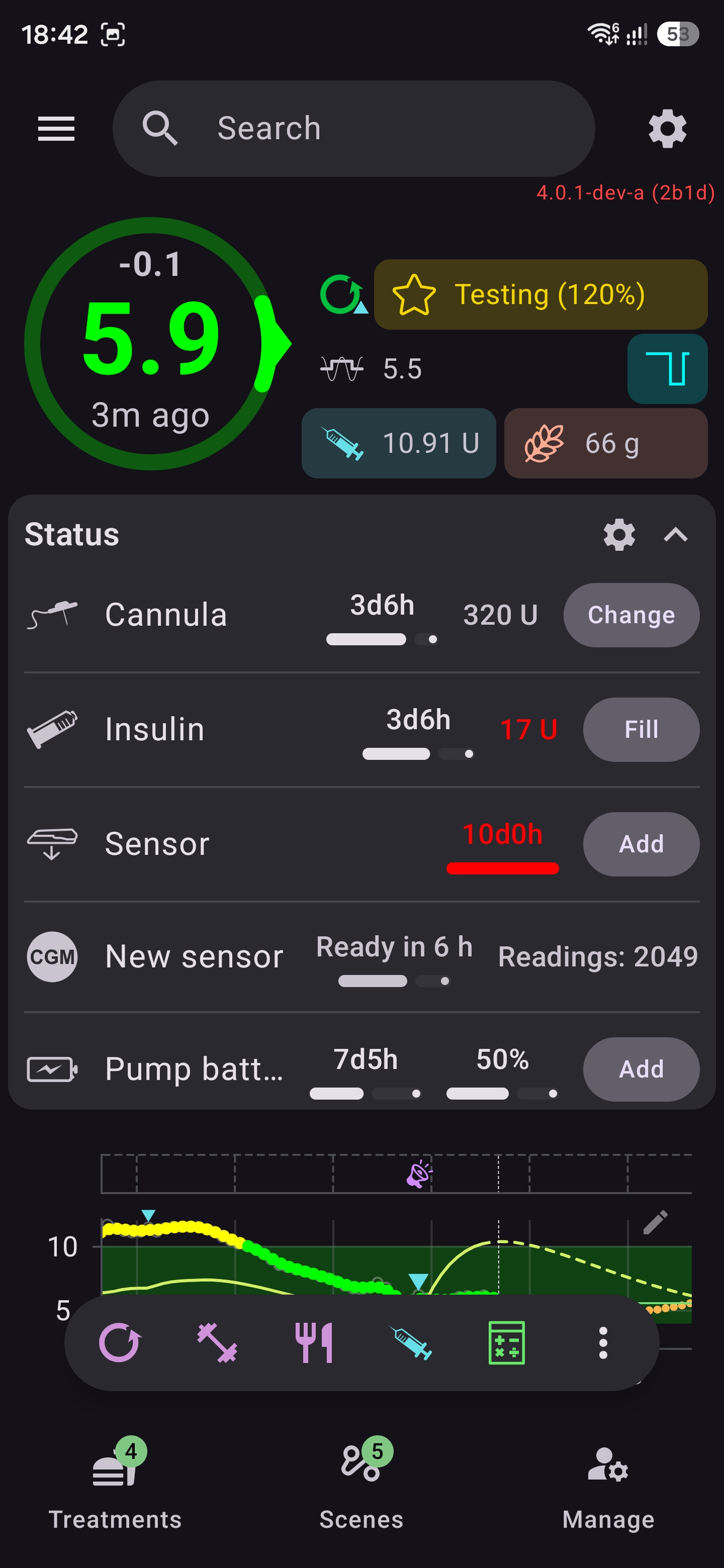
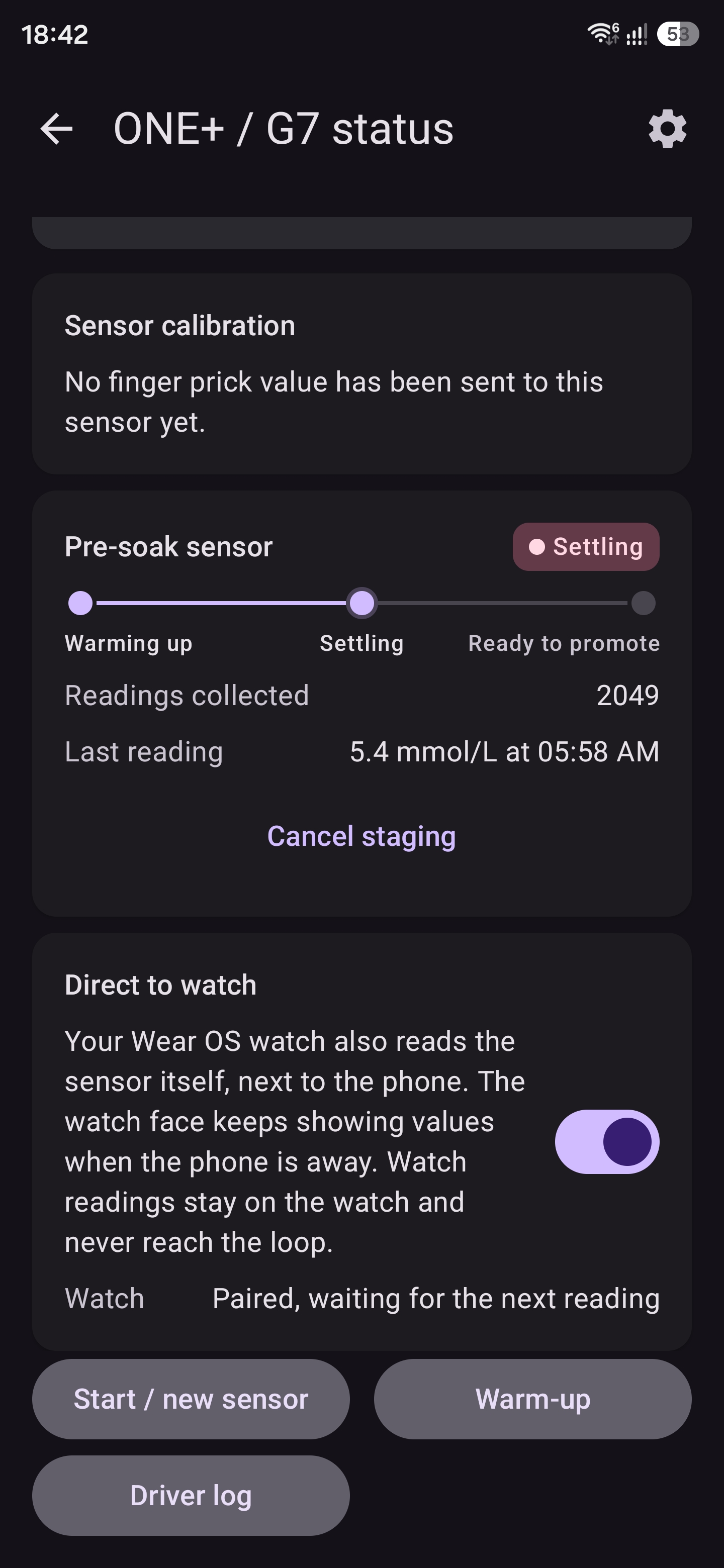
No reading since 5 am then no switch possible ... |


But it stopped collecting BG readings with no explanation I will try to connect to it when it ends but I don't know when it ends as AAPS used date when connected to sensor and not its date when inverted to body anyway to force read it? Also where is the alarm settings? |

|
Started testing this yesterday, merging this PR with latest dev commits. Connecting to a running sensor was no problem. Connection was stable: did not miss a single BG value that could not be explained by sensor out of range of AAPS offline. However: I did not get any sensor alarms!?
CGM alarms Alarm settings are in AAPS under "Local alerts" settings:
Notifications on smartwatch: General conclusion:
|
So not getting alarms from plugin. Above states all are off by default, not clear: |
What BG alert levels are not configurable. What levels are used for current PR? |
Each CGM alarm (switch, level, delay, repeat, sound) was a sub screen inside "CGM alarms", inside
the local alerts card: a third level. The settings screen draws two levels only, and a third level
is drawn as nothing, so no alarm could be switched on or set. Only the mute and test row showed.
The search found the settings but could not open them.

CGM alarms is now its own card after the local alerts, with one section per alarm, and the search
lists it as its own category. SettingsScreenDepthTest keeps every built-in card at two levels.
The button stops the alarm for its repeat time and the alarm comes back if the cause is still
there: that is a snooze, and testers looked for one. English only, translations come from Crowdin.
The driver cannot tell a G7 from a ONE+: the Bluetooth name does not say it (a G7 often shows a
short DX02 name). The session length does in one case: only a G7 runs 15 days. So the sensor row
of the status screen now says "G7 15-day sensor" there, and a 10-day sensor keeps the neutral name.

Three texts still named only the ONE+; they now say "ONE+ / G7", like the others. The Nightscout
device name AAPS-DexcomOnePlus is kept: it is how the readings are found again in the history.
A sensor that was already running when AAPS connected to it (started in xDrip+, in the Dexcom app,
or before AAPS was installed again) got the time of that connection as its start. Its age and its
end alarms were wrong until the user corrected the date by hand.

Every G7 / ONE+ glucose message (0x4e) carries the time since the sensor was activated, the value
Trio's G7SensorKit uses. The session put it on the warm-up state, and the plugin now takes it when it
is more than 15 minutes from the stored start: the SENSOR_CHANGE written for the old start goes, and
one is written at the real start. The older 0x4f message counts from the transmitter and is not used.

It happens once per sensor (a mark tied to the sensor's Bluetooth address), and never over a start
the user corrected by hand. Events of an earlier sensor stay. A start in the future, or older than a
whole sensor life, is ignored.
Hi, i added CGM alerte menu and fix it |
Confirming. Can now configure and getting alerts now. Q: Default is no alarms at all. Not sure if this is ok. |

|
Confirmed alerts now work, direct to watch is back to asking for a permission I cannot grant however but alerts are working well. |
What happens when the sensor stops early (i.e pre-soak was started late): Feature request: |

|
I have started testing and reviewing this PR. My first impression is that there are too many settings and too much text in general. I think it needs to be simplified a bit for a better user experience. Some suggestions below. Sensor change settingsThe plugin now has four settings about the sensor start:
I suggest removing all four from this plugin. Why none is needed
Suggested behaviour, with no settings
The shared "Create sensor change" setting stays for the other BG sources. This plugin would only stop showing and reading it. Pre-soak with no active sensorWhen no sensor is active at all, the pre-soak parts of the screen should be hidden or disabled. A second sensor only makes sense when there is a first one. Start screen: Production / Pre-soak tabs
Direct to watch
Which screen opens firstWhen I open the plugin, I get the list of the latest received BG values. I suggest two tabs at the top, like "Production" and "Pre-soak" on the Start screen: Status to the left and the BG list to the right. Status should be the selected tab when the plugin opens. |

|
I was able to connect my latest One+ with my Motorola G56 (the one with a broken Bluetooth firmware)
In a nutshel, impossible for me to transfert collector from phone to GW4 to have GW device requesting pairing to one + (somewhere in AAPS Watch app), receiving BG data from the one+ and then sending this BG data to the B7/One+ AAPS plugin every 5 min to have the loop running ! I hoped I could send the pairing information from phone to watch the same way it's done in juggluco (both app, phone and watch are synchronised, and we just have to set if the collector is on one side or on the other side), to use this G7/One+ plugin included in AAPS, but I couldn't make it work. 😭 |

|
I am currently pre-soaking for the first time. 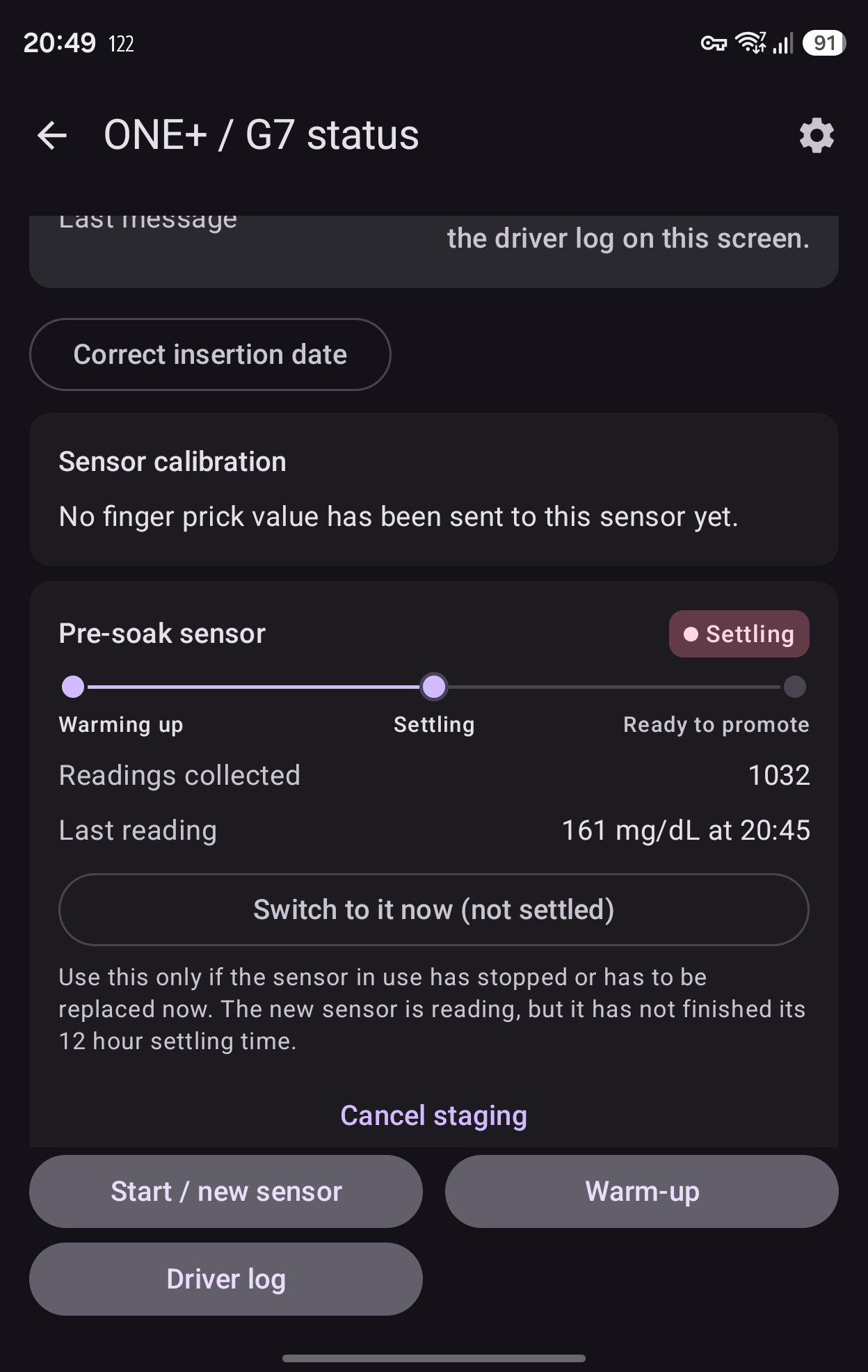
What does "Readings collected" mean? 1032 bg readings is impossible for the runtime of maybe 2-3 hours. |
Great review. |
|
Feature suggestion:
|
|
Something confusing for me, I was not able to find anything related to G7 plugin within the watch...
Nothing like that within AAPS G7 plugin, so Imaybe didn't do the right thing to have only the watch connected to the G7... |
|
On auto-promote:
What happens when the active sensor expires/ends before the preset number of hours? Suggested behavior: Example:
|
|
On sensor switch / auto-promote: Suggested feature: "Compared to latest BG reading, new sensor disagrees on current BG (old: xxx, new yyy)" |
|
Feature suggestion: Not sure if this is feasible 🤔: (Similar to AAPS showing both sensor BG and calibration plugin BG) |
the transfert to the watch was done when the data was coming from the sensor ? did you get the permission message ? will call you about it |
working on it |
…or normal link parameters when the sensor's make the link slow.

Port of two fixes from kmp-aimi-migration-study (662fdf8, 9a0e7cf),
from field reports with a snoop log on a GENERIC_FALLBACK phone.

Lost cycles:
- A sensor that closed the link itself (GATT status 19) sleeps until its
  next cycle. The session now waits for that cycle with the post-cycle
  guard instead of parking an autoConnect at once. After a lost link
  (status 8) the immediate autoConnect stays.
- The immediate autoConnect no longer counts as a blind connect, so it
  does not block the real blind escape for 4 minutes.
- After a cycle that reached the sensor, the silence is counted from that
  moment.
- GENERIC_FALLBACK lets an autoConnect wait 150 s instead of 60 s
  (autoConnectTimeoutMs). Other profiles keep 60 s.
- disconnect() ends a connect that is still waiting.

Link parameters:
- Android's link parameters are logged on every change ("link params
  interval=... latency=..."), so they show without an HCI snoop log.
- Only when a link has a peripheral latency above 0 does the driver ask
  for CONNECTION_PRIORITY_BALANCED, at most 3 times per link. A normal
  link (latency 0) gets no request.

Left out of the port, because this branch does not have them: the iPhone
held connect and the pump setup radio back-off.

Tests: :plugins:dexcom_oneplus testAndroidHostTest 301, 0 failures.
One+ was paired within the phone (sensor id visible within Bluetooth paired devices) but it was a while after the pairing (more than 1 hour later), so due to G56 bugs, I was no more able to receive new BG values in AAPS. I saw no change after the switch to watch was set to enable in G7 plugin settings
👍 (Tell me when you are back in France 😉) |


Dexcom ONE+ / G7: native BLE BG source
What it is
A new BG source, "Dexcom ONE+ / G7", in Config Builder (BG source section, right after "Dexcom"). AAPS talks to the sensor over Bluetooth LE by itself. No Dexcom app, xDrip or other companion app is needed. Readings reach the loop through the normal
insertCgmSourceDatapath, like any other BG source.What the user gets
Start screen
Warm-up screen
Status screen
Driver log screen: shows the recent driver log lines, for support questions.
Pre-soak of a second sensor
The user can start the next sensor while the current one still runs.
The second sensor's readings are only collected (visible in status section) and never reach the loop.
After 12 h of soak and 6 valid readings, the user can switch. An early switch is possible, with a warning.
Automatic switch to the pre-soaked sensor (setting "auto promote", off by default). When
it is on, AAPS switches to the second sensor by itself, a number of hours after the pre-soak
start (12 by default, 6 to 24), if its readings are recent and real. The user gets a
notification when it happens. It is off by default because the switch stops the sensor in use
and the rest of its life is lost. The Switch button always works, with or without this setting.
Overview status card: two rows for warm-up (minutes left and a progress bar) and for the new sensor ("Warming up", "Ready in n h", "Ready to switch" with a confirmed Switch button). They only appear when the active source reports them.
Sensor-change settings (on by default):
Dosing-relevant functions
How it works
:plugins:libkeks, translated from xDrip Java to Kotlin and checked with tests.:plugins:dexcom_oneplus): scans, connects over GATT, authenticates, then reads glucose (EGV) every 5 minutes.DexcomOnePlusPlugin, key 446):onStartandonStop, so nothing runs for users who never enable it.connectedDevicekeeps the Bluetooth session alive while a sensor is stored.ADVANCED_FILTERING_SENSORS, as G6 and G7 are. This enables SMB-always and SMB with COB through BYODA, which is dosing-relevant.The Libre 3 / 3+ / Select and Dexcom ONE+ / G7 drivers have been running in AIMI build since several month. This PR brings only the Dexcom ONE+ / G7 driver to dev. A separate PR for Libre 3 / 3+ / Select will follow soon.
source, so they do not belong in one source plugin. They change the core notification code
(
NotificationId,LocalAlertUtils, the alarm sound policy), and that needs its own review.CGM_STAGING_AUTO_PROMOTED,for the automatic switch to a second sensor. Nothing else.
LocalAlertUtilsis not changed. It applies tothis source like to any other BG source.
reviewed one by one.