
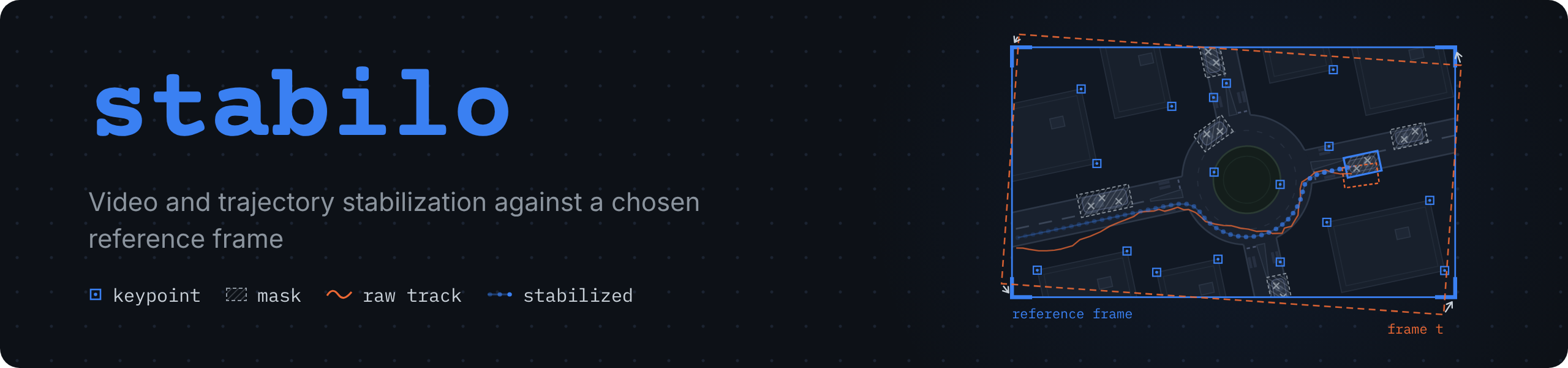













Stabilo stabilizes video frames and tracked object trajectories against a chosen reference frame, using robust homography or affine registration with optional exclusion masks for dynamic regions. It is the registration engine behind Geo-trax 🚀, and its pipelines and parameters can be benchmarked and tuned with Stabilo Benchmark 🎯.
🎬 An accelerated preview of Stabilo's capabilities. Watch the full 14-second 4K demo on YouTube.
- 🎯 Anchored, not smoothed: every frame and every tracked box is aligned to one chosen reference frame, so coordinates stay comparable across the whole video, not just between neighbouring frames.
- 🎭 Masks that ignore moving objects: exclude vehicles, pedestrians, or any dynamic region from registration, using five mask geometries (boxes, oriented boxes, four-point boxes, polygons, circles).
- 🧠 Classical and learned features in one API: 6 classical detectors (ORB, SIFT, RootSIFT, BRISK, KAZE, AKAZE) and 5 learned ones (XFeat, DISK, DeDoDe, KeyNet, LoFTR), paired with classical (BF, FLANN) or learned (LightGlue) matchers, see Feature Detectors and Matchers, all swappable with a single flag.
- ⚡ Two acceleration paths: OpenCV CUDA for the classical pipeline (
--gpu) and any PyTorch device for the learned models (--device cuda|mps); see Configuration. - 📦 Library and CLI:
stabilo videoandstabilo tracksneed no code; theStabilizerclass embeds into your own pipeline in a handful of lines. - 🔬 Battle-tested: powers the georeferenced trajectory extraction in Geo-trax; Stabilo Benchmark can benchmark and tune its pipelines on static and dynamic urban scenes (paper).
It is recommended to create and activate a Python virtual environment (Python >= 3.11 and <= 3.13) first:
python3.11 -m venv .venv
source .venv/bin/activate  # On Windows: .venv\Scripts\activate
Alternatives: conda or uv
conda create -n stabilo python=3.11 -y
conda activate stabilo
uv (fastest; use uv pip install below):
uv venv --python 3.11
source .venv/bin/activate  # On Windows: .venv\Scripts\activate
Install from PyPI:
pip install stabiloThis installs everything, including the learning-based detectors and matchers (kornia + torch). The first time a learned detector or matcher (xfeat, disk, dedode, keynet, loftr, lightglue) is used, its pretrained weights are downloaded into torch's cache directory (~/.cache/torch/hub/checkpoints on Linux/macOS, %USERPROFILE%\.cache\torch\hub\checkpoints on Windows; override with the TORCH_HOME env var) and reused from there on every later run, offline.
Install from local source (for development)
git clone https://github.com/rfonod/stabilo.git
cd stabilo && pip install -e '.[dev]'
Drop -e for a non-editable install, and [dev] if you do not need pytest and ruff.
data/video.mp4 is a short drone clip bundled for immediate testing, along with per-frame vehicle boxes in data/video.txt. See data/README.md for the reference outputs.
# Stabilize the video against frame 0, saving the result and a side-by-side visualization
stabilo video data/video.mp4 --save --save-viz --output data/out/

# Stabilize the vehicle trajectories, using the same boxes as exclusion masks
stabilo tracks data/video.mp4 --save --save-viz --output data/out/
Both write into the git-ignored data/out/, so you can diff your results against the reference files committed in data/ without overwriting them. Run stabilo -h, stabilo video -h, or stabilo tracks -h for the full option list.
Stabilo ships classical OpenCV detectors and learning-based detectors/matchers from kornia as core functionality. The learning-based options download pretrained weights on first use (see Installation) and benefit from a GPU (--device cuda or --device mps).
detector_name |
Type | Descriptor | Compatible matchers | Speed (CPU) | Rotation invariant | Memory | Acceleration |
|---|---|---|---|---|---|---|---|
orb (default) |
classical, binary | 256-bit | bf, flann |
very fast | ✅ | low | OpenCV CUDA (--gpu) |
sift |
classical, float | 128-d | bf, flann |
medium | ✅ | low | — |
rsift |
classical, float | 128-d (RootSIFT) | bf, flann |
medium | ✅ | low | — |
brisk |
classical, binary | 512-bit | bf, flann |
fast | ✅ | low | — |
kaze |
classical, float | 64-d | bf, flann |
slow | ✅ | low | — |
akaze |
classical, binary | 486-bit | bf, flann |
fast | ✅ | low | — |
xfeat |
learned, sparse | 64-d float | bf, flann |
fast | ❌ | low | torch (--device) |
disk |
learned, sparse | 128-d float | bf, flann, lightglue |
medium | ❌ | high | torch (--device) |
dedode |
learned, sparse | 256-d float | bf, flann, lightglue |
slow | ❌ | high | torch (--device) |
keynet |
learned det. + HardNet desc. | 128-d float | bf, flann, lightglue |
medium | ✅ | high | torch (--device) |
loftr |
learned, detector-free | dense matching | built-in (matcher ignored) | slow | ❌ | very high | torch (--device) |
Three matchers are available: bf (brute force) and flann work with every detector, while the learned lightglue pairs with disk, dedode, and keynet. loftr is detector-free: it matches an image pair directly, so filter_type and the bf/flann choice of matcher_name are ignored (lightglue is rejected). Full details in docs/usage.md.
Note
A benchmark of these pipelines. Stabilo Benchmark evaluates complete registration pipelines run through Stabilo (detector, descriptor, matcher, robust estimator, and object masking) for reference-based stabilization of hovering-drone video over static and dynamic urban scenes, at an offline and a real-time compute budget. See the paper and its data record; the stored results were produced with stabilo 1.4.5.
Important
Two caveats apply to the learning-based detectors. They are worth understanding before you pick one.
- Rotation.
xfeat,disk,dedode, andloftrare upright models: matching collapses once the current frame is rotated more than roughly 30° from the reference frame. Footage with large in-plane rotation (an orbiting or yawing drone, for example) needs a classical detector orkeynet, which estimates a keypoint orientation. This is a property of the pretrained models, not of stabilo. - Memory. They are far hungrier than the classical detectors, and cost grows with the processed frame size. At the default
--downsample-ratio 0.5, a 4K frame is still 2 MP, which can exhaust system memory;loftris the worst offender because its cost grows quadratically with the pixel count. Lower--downsample-ratiofor large inputs. Stabilo warns when the processed frame size looks risky, but does not cap it. See Choosing a downsample ratio.
📋 Full Feature Overview
- Video stabilization: warp every frame onto a chosen anchor frame (
stabilo video ... -rf 100) with a projective or affine model (--transformation-type affine --ransac-method 8). See Library Usage. - Trajectory stabilization: transform per-frame detections or tracks into the reference coordinate system (
stabilo tracks ... --boxes-enc xywha), reading and writingyolo,pascal,coco,xywha, orfourencodings. - Exclusion masks: suppress keypoints on dynamic objects, in five geometries fed by seven input encodings (
--mask-enc yolo|pascal|coco|xywha|four|polygon|circle), with an adjustable safety margin (--mask-margin-ratio 0.15). Disable with--no-mask. See Masking behaviour. - Classical detectors: ORB, SIFT, RootSIFT, BRISK, KAZE, AKAZE (
--detector-name rsift), with BF or FLANN matching (--matcher-name flann) and cross-check, Lowe's ratio, or distance filtering (--filter-type ratio). - Learning-based detectors: XFeat, DISK, DeDoDe, KeyNet, and the detector-free LoFTR via kornia (
--detector-name disk), optionally paired with the learned LightGlue matcher (--matcher-name lightglue). Pretrained weights download once into torch's cache and are reused offline. Mind the rotation and memory caveats above; pair them with a lower--downsample-ratio. - Robust estimation: MAGSAC++ by default, plus GC-RANSAC, three LO-RANSAC (USAC) variants, PROSAC, RHO, LMEDS, RANSAC (
--ransac-method 36), with tunable threshold, iterations, and confidence (--ransac-epipolar-threshold 1.5). The threshold is measured in full-resolution pixels by default, or in downsampled-image pixels with--ransac-threshold-space processed. See RANSAC methods. - Pre-processing: CLAHE contrast enhancement (
--clahe) and detection-time downsampling for speed (--downsample-ratio 0.25), with keypoints rescaled back to full resolution. - Acceleration: OpenCV CUDA for the classical pipeline (
--gpu, seedocs/cuda.md) and CUDA/MPS/CPU for the learned models (--device mps). - Visualization: live or recorded side-by-side rendering of matches, inliers, masks, and box trajectories (
--viz,--save-viz,--no-lines,--tail-length 60). See Visualisation mode. - Benchmarking:
benchmark=Truefalls back to the identity matrix and silences warnings for clean batch sweeps; to benchmark and tune complete pipelines, see Stabilo Benchmark 🎯.
🚀 Planned Enhancements
- Bi-directional Matching: Implementing bi-directional matching to enhance the robustness of keypoint matching.
- Additional Feature Detectors: Adding support for more feature detectors and matchers to provide users with a wider range of options for stabilization.
🔗 Related Projects
Stabilo integrates with and complements several specialized tools:
-
Geo-trax 🚀: End-to-end framework for extracting georeferenced vehicle trajectories from drone imagery. Uses Stabilo as its core stabilization engine to align video frames and vehicle tracks to a common reference frame.
-
Stabilo Benchmark 🎯: Benchmark of complete reference-based registration pipelines on static and dynamic urban scenes, all run through Stabilo, at an offline and a real-time compute budget. Can be used to benchmark and tune Stabilo's pipelines and parameters. Accompanies the paper Consensus Capture in Reference-Based UAV Video Stabilization: A Benchmark on Dynamic Urban Scenes; data record at 10.5281/zenodo.23623540.
-
HBB2OBB 🔄: Converts horizontal bounding boxes to oriented bounding boxes using SAM segmentation models. Can be used alongside Stabilo when object orientation is needed for downstream analysis.
-
Stabilo-Optimize 🎛️: Superseded by Stabilo Benchmark. Ground-truth-free benchmarking and tuning of Stabilo on static scenes, implementing the static campaign of the Geo-trax article.
Every tunable parameter lives in one self-contained YAML file, stabilo/cfg/default.yaml, grouped by stage: feature detection, matching and filtering, transformation estimation, exclusion masks, pre-processing, hardware acceleration, detector-specific settings, and diagnostics. The shipped defaults are tuned for high-altitude bird's-eye-view drone imagery.
The same keys are accepted as Stabilizer(**kwargs) arguments, as CLI flags, and as entries in a custom YAML file:
stabilo video data/video.mp4 --save -o data/out/ --detector-name disk --matcher-name lightglue
stabilo video data/video.mp4 --save -o data/out/ --custom-config custom.yaml
Precedence is explicit CLI flags > custom config file > built-in defaults: a value in --custom-config fills in anything you didn't pass on the command line, but an explicit CLI flag always wins.
Two independent, mutually exclusive acceleration knobs are worth calling out:
| Option | Applies to | Notes |
|---|---|---|
gpu / --gpu |
classical detectors | OpenCV CUDA for detection, matching, and warping. Needs a CUDA-enabled OpenCV build (docs/cuda.md); currently orb only. RANSAC always runs on CPU. |
device / --device |
learning-based detectors/matchers | PyTorch device (auto, cpu, cuda, mps). auto picks cuda > mps > cpu. Ignored by the classical detectors. |
⚙️ Inspect, copy, and customize the config
Manage the bundled configuration with the stabilo config command:
stabilo config show                 # print the default configuration
stabilo config copy                 # write an editable copy to ./custom.yaml
stabilo config copy -o ~/myproject  # write it somewhere else
Copy it, edit it, then pass it with --custom-config:
stabilo config copy
# edit custom.yaml ...
stabilo video data/video.mp4 --save -o data/out/ --custom-config custom.yaml
A full description of every key, with valid ranges, is in docs/usage.md.
from stabilo import Stabilizer

stabilizer = Stabilizer()                            # see Configuration for kwargs

stabilizer.set_ref_frame(ref_frame, ref_mask)        # anchor frame (+ optional exclusion mask)
stabilizer.stabilize(cur_frame, cur_mask)            # register any other frame against it

stabilized_frame = stabilizer.warp_cur_frame()       # the warped frame
stabilized_boxes = stabilizer.transform_cur_boxes()  # the transformed boxes
matrix = stabilizer.get_cur_trans_matrix()           # current -> reference transform
Masks and boxes accept five formats: xywh (axis-aligned), xywha (oriented), four (four corner points), polygon, and circle.
🧩 More examples: oriented boxes, polygons, and circles
import numpy as np

# Oriented bounding boxes (OBBs): [x_center, y_center, width, height, angle_degrees]
obb_boxes = np.array([
    [100, 150, 50, 30, 45],
    [200, 200, 60, 40, 90],
])
stabilizer.set_ref_frame(ref_frame, obb_boxes, box_format='xywha')
stabilizer.stabilize(cur_frame, cur_boxes, box_format='xywha')

# Convert the result to another format on the way out
transformed = stabilizer.transform_cur_boxes(out_box_format='four')

# Polygon masks: flattened [x1, y1, ..., xN, yN] rows, or (N, 2) point arrays
polygon_masks = np.array([
    [60, 60, 120, 60, 120, 120, 60, 120],
    [200, 200, 260, 210, 240, 270, 190, 260],
])
stabilizer.set_ref_frame(ref_frame, polygon_masks, box_format='polygon')

# Circular masks: [x_center, y_center, radius]
circle_masks = np.array([
    [120, 120, 25],
    [360, 240, 40],
])
stabilizer.stabilize(cur_frame, circle_masks, box_format='circle')

# Transform an arbitrary pixel coordinate into reference-frame coordinates
M = stabilizer.get_cur_trans_matrix()  # 3x3 (projective) or 2x3 (affine)
p = M @ np.array([x, y, 1.0])
ref_point = p[:2] / p[2] if M.shape[0] == 3 else p
polygon and circle are masking-only; they cannot be transformed back out. Full format specifications are in docs/usage.md.
The first time a CLI command runs or a
Stabilizeris created in a process, stabilo performs a best-effort check for a newer release on PyPI (skipped withbenchmark=True) and logs a one-line notice if one is available. SetSTABILO_DISABLE_UPDATE_CHECK=1to disable it.
The full documentation, including the CLI and API references, is published at rfonod.github.io/stabilo. Its sources live in this repository:
docs/usage.md: detailed usage guide covering the workflow, mask formats, every configuration key, the detector and matcher reference, RANSAC methods, visualization, benchmarking, and the CLI.docs/cuda.md: building OpenCV with CUDA and enabling--gpu.
If you use Stabilo in your research, software, or product, please cite the following resources appropriately:
-
Preferred Citation: Please cite the associated article for any use of the Stabilo package, including research, applications, and derivative work:
@article{fonod2025advanced,
  title = {Advanced computer vision for extracting georeferenced vehicle trajectories from drone imagery},
  author = {Fonod, Robert and Cho, Haechan and Yeo, Hwasoo and Geroliminis, Nikolas},
  journal = {Transportation Research Part C: Emerging Technologies},
  volume = {178},
  pages = {105205},
  year = {2025},
  publisher = {Elsevier},
  doi = {10.1016/j.trc.2025.105205},
  url = {https://doi.org/10.1016/j.trc.2025.105205}
}
-
Repository Citation: When referencing or building on the code itself (replace
1.x.xwith the version you used):@software{fonod2026stabilo, author = {Fonod, Robert}, title = {Stabilo: A Comprehensive Python Library for Video and Trajectory Stabilization with User-Defined Masks}, year = {2026}, month = nov, version = {1.x.x}, license = {MIT}, doi = {10.5281/zenodo.12117092}, url = {https://github.com/rfonod/stabilo} }
-
Benchmark Citation: If you build on the benchmark of Stabilo's pipelines, please cite (software and data citations are in Stabilo Benchmark):
@article{fonod2026benchmark,
  author  = {Fonod, Robert and Geroliminis, Nikolas},
  title   = {Consensus Capture in Reference-Based UAV Video Stabilization: A Benchmark on Dynamic Urban Scenes},
  journal = {arXiv preprint arXiv:2611.17190},
  year    = {2026},
  doi     = {10.48550/arXiv.2611.17190}
}
Contributions from the community are welcome! If you encounter any issues or have suggestions for improvements, please open a GitHub Issue or submit a pull request.
This project is distributed under the MIT License. See the LICENSE file for more details.