

Rotorflight is a powerful flight control software suite built specifically for single-rotor RC helicopters. It is not designed for multirotors or airplanes. The software includes:
-
Rotorflight Flight Controller Firmware
-
Rotorflight Configurator – used for flashing and configuring the flight controller
-
Rotorflight Blackbox Explorer – for analyzing flight logs
-
Rotorflight Lua Scripts – used to configure the flight controller directly from your transmitter
These scripts support the following transmitter operating systems:
-
EdgeTX / OpenTX
-
Ethos (this repository)
Rotorflight is based on Betaflight 4.3, but includes a wide range of advanced features optimized for helicopter flight. This version of Rotorflight is also referred to as Rotorflight 2 (RF2).
RFSuite is a touch-based, Lua-scripted GUI suite for the Ethos platform. It enables easy setup, tuning, and diagnostics of Rotorflight-based helicopters using supported FrSky transmitters. It offers:
-
Full touchscreen interface
-
FrSky and ELRS receiver compatibility
-
Multiple embedded tools and widgets
-
Flight-phase dashboards with statistics and quick access to battery profiles
-
SmartFuel monitoring and battery profile management
-
Configurable voice announcements and alerts for flight status, battery, ESC temperature and telemetry loss
-
Multilingual interface and localized sound packs
You can preview the experience using the interactive simulator:
This opens the RFSuite in your browser, showcasing its functionality within the Ethos UI.
Status Widget
Dashboard themes are available for different flight states. See the Dashboard Themes Overview to compare the available theme previews.

Flight Logs

FBL Configuration (Home)

Governor Configuration

RFSuite can display telemetry and alerts on compatible ActiveLook smart glasses, with configurable layouts for preflight, inflight and postflight. See the ActiveLook Layout Overview for previews of all five layouts and the alarm and status overlays.
- Configuration Pages: Reference for all 87 configuration and tuning pages, organized by menu domain (Flight Tuning, Setup, Tools, Logs, Settings). Generated from the menu hierarchy and the page sources, and filled in as changes reach them — see the index for the current page list.
- Documentation Overview: Directory map, conventions, dashboard theme overviews, and memory lifecycle guides.
- Page Template: Canonical template and frontmatter standard for all configuration pages.
- Scaffold Generator: CLI tool to scaffold, inspect, and verify that every reachable page has a documentation file (
bin/docs/generate_menu_docs.cmd --check). It checks that a file exists, not that its contents are right.
Rotorflight includes a rich feature set, including:
-
Receiver: CRSF, S.BUS, F.Port, DSM, IBUS, XBUS, EXBUS, GHOST, CPPM
-
Telemetry: CRSF, S.Port, HoTT, and more
-
ESC telemetry: BLHeli32, Hobbywing V4/V5, Scorpion, Kontronik, OMP Hobby, ZTW, APD, YGE (OpenYGE), FlyRotor, Graupner, XDFLY and FrSky F.BUS; SRXL2
-
Advanced PID control tuned for helicopters
-
Rotor speed governor
-
Stabilization modes (6D)
-
Tail Torque Assist (TTA or TALY)
-
Motorized tail support
-
Via transmitter knobs/switches
-
Lua script interface on EdgeTX/OpenTX/Ethos
RFSuite lets you read and adjust compatible ESC settings directly from your Ethos transmitter, including motor timing, startup behavior, governor settings and BEC voltage where supported. Available settings depend on the ESC model and firmware.
- Supported ESC manufacturers and firmware: Hobbywing (V5), FlyRotor, OMP Hobby, Scorpion, XDFLY, YGE and ZTW, AM32, BLHeli_S and Bluejay
-
AUX outputs for custom motor/servo functions
-
Fully customizable mixer
-
Sensor support: voltage, current, BEC, etc.
-
Advanced filtering: Dynamic RPM notch, FFT-based notch, and LPF
-
High-speed Blackbox logging
-
Multiple configuration and rate profiles
-
DSHOT, PWM, Multishot ESC protocols
-
RGB LEDs and buzzers
-
GPS integration
To use RFSuite, you'll need:
-
Ethos 1.6.2 or later
-
A compatible FrSky transmitter:
- X10, X12, X14, X18, X20, XE or Twin X Lite
-
A supported receiver:
-
FrSky (Smartport or F.Port over ACCESS, ACCST, TD, TW)
-
ExpressLRS (ELRS) modules supported by Ethos
-
RFSuite has been successfully tested on the following receiver models (with X10, X14, X18, X20, XLite):
-
TWMX
-
TD MX
-
R9 MX ACCESS
-
R9 Mini ACCESS
-
Archer RS / Archer Plus RS / RS Mini (ACCESS / F.Port)
-
RX6R ACCESS
-
R-XSR ACCESS / ACCST F.Port
-
ELRS (all versions)
For Windows, Mac & Linux users, a prebuilt GUI updater is available to simplify updating files on the radio without using VS Code or Python.
- Download: https://github.com/rotorflight/rotorflight-lua-ethos-suite-updater/releases
- Standalone Windows executable (plus macOS/Linux builds)
- Intended for end users or quick updates
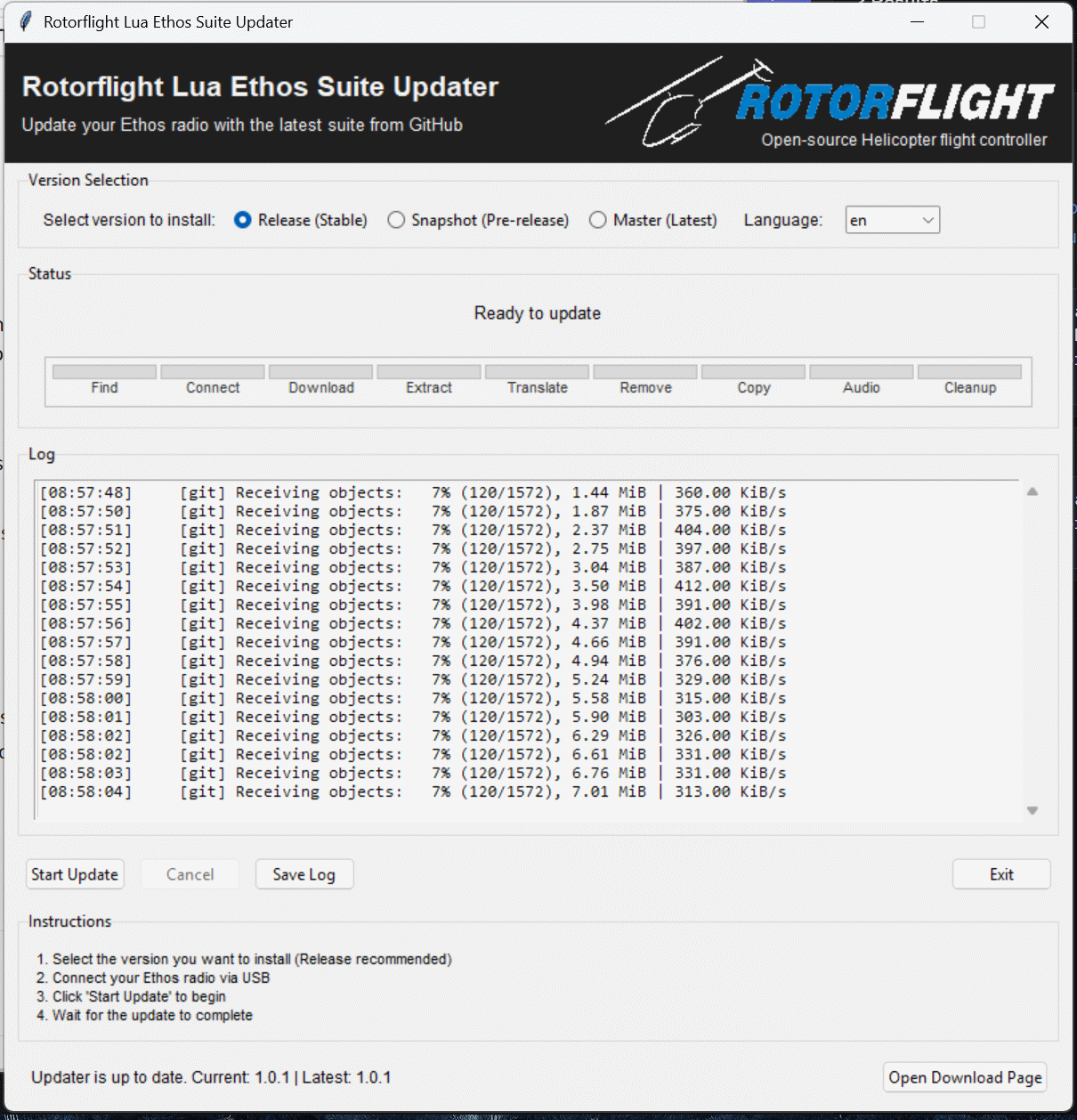
You can also install a release package using FrSky Suite (formerly Ethos Suite):
- Download the RFSuite release ZIP for your language from the Releases page, under Assets.
- Connect your transmitter to FrSky Suite and open ETHOS → Lua library.
- Under Install Lua scripts, open the downloaded ZIP to install it on the radio.
Use a release package rather than Code → Download ZIP, which contains the source files. See the official Suite guide for details.
To build and deploy RFSuite locally:
-
Visual Studio Code (VS Code)
-
Python 3
-
Install libraries (optional: the deploy tasks install any that are missing on first run)
python -m pip install -r requirements.txt
Radio HID control uses the
hidapipackage, which includes the native library, so no separatehidapi.dllorbrew install hidapiis needed. -
Install the VS Code extension
Ethos
Run these via Terminal → Run Task. For simulator deployment and launch together, select Deploy & Launch [SIM] in Run and Debug.
| Task | Purpose |
|---|---|
| Deploy & Launch [SIM] | Deploys to the configured simulator; the Run and Debug configuration also launches it. |
| Deploy Radio | Deploys scripts, translations, sound packs and sensors to the radio. |
| Deploy Radio + Serial Debug | Deploys to the radio and opens the serial debug console. |
| Radio: Serial Debug | Opens the serial debug console without deploying. |
| Run RFSuite Sensor Tool | Opens the sensor editor for simulator test values. |
| ActiveLook Preview | Opens the local browser preview for layouts, telemetry and alerts; requires Python 3.11+ and the preview dependencies. |
For language selection, use Set Deployment Language in Run and Debug, or set rfsuite.deploy.language in .vscode/settings.json. The task RFSuite: Set Deployment Language currently lacks its input definition in tasks.json.
Rotorflight is a community-driven open-source project. You can contribute by:
-
Helping users on Rotorflight Discord or forums
-
Reporting issues or requesting features via GitHub
-
Testing and giving feedback on new versions
-
Updating the Rotorflight documentation
-
Translating the configurator to other languages
-
Contributing code (fixes, features, enhancements)
🔧 See the full Contributing Guide
Rotorflight is open source and available free of charge, with no warranties.
-
Forked from Betaflight
-
Which was forked from Cleanflight
-
Also draws inspiration and code from HeliFlight3D
🙏 A big thank you to everyone who has contributed along the way!
📧 Reach out to the Rotorflight team at:
rotorflightfc@gmail.com
If you find Rotorflight useful, please consider supporting the development by donating to the Rotorflight Project.