




Open source analytics for Laravel that tells you which marketing channels actually make you money. Server-side, from first visit to paying customer. Set up in minutes.
Plausible doesn't know what you earn. Stripe doesn't know where your customers come from. SimpleStats knows both.
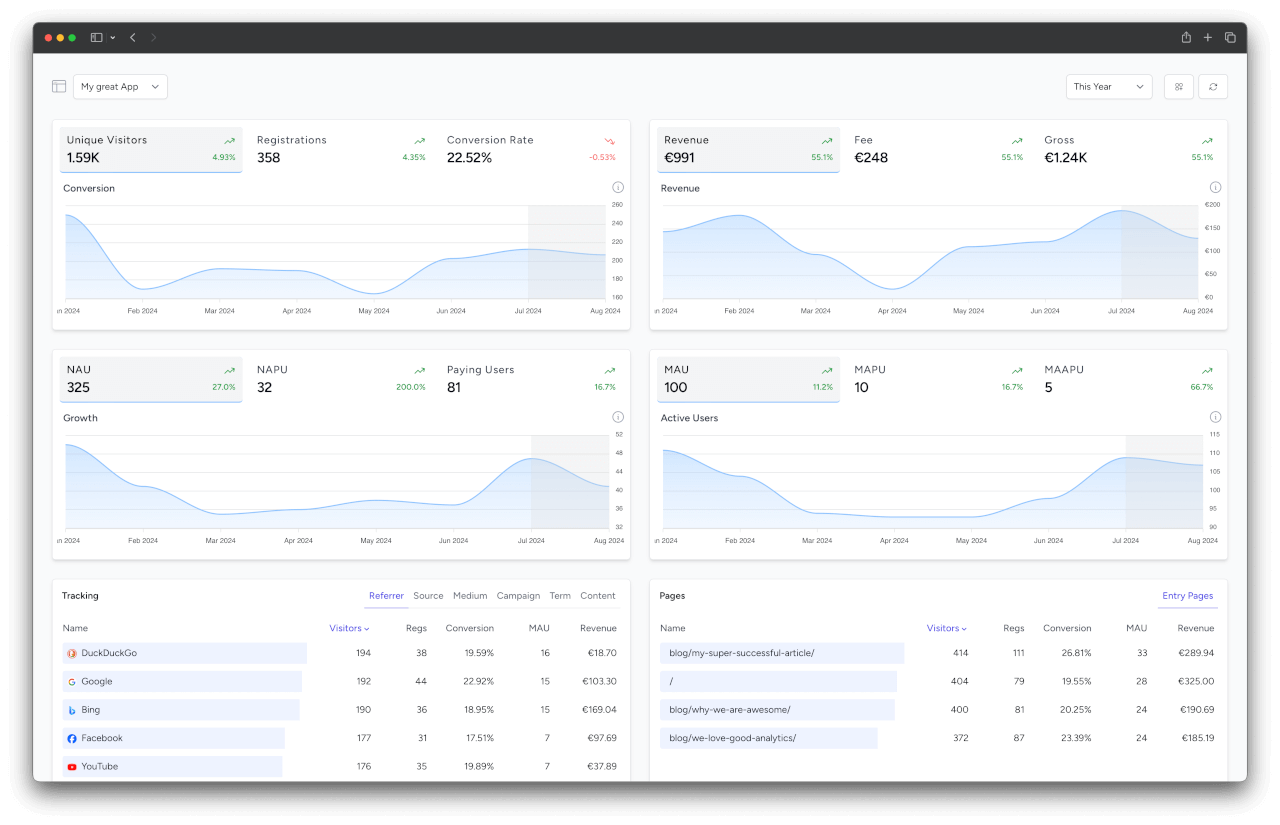
Web analytics tools see your traffic but never your revenue. Billing and subscription tools see your revenue but have never heard of your utm_campaign. So the question that decides your marketing budget, which campaign is actually profitable?, is answered by nobody.
SimpleStats tracks visitor → registration → payment as one connected chain, directly inside your Laravel app:
- Revenue attribution: every signup and payment is tied back to the source, campaign and referrer that brought the user in.
- Campaign profit: add your ad spend and get ROAS, CAC and LTV:CAC per channel.
- Subscription metrics: selling subscriptions? MRR, ARR, churn and retention cohorts, filterable by channel. One-time payments work just as well.
- Server-side: tracked through Laravel itself (middleware, observers, event listeners), so ad blockers can't touch it.
- GDPR-compliant: no cookies, no stored IPs.
Use the hosted version at simplestats.io (free plan available), or run it on your own infrastructure with the steps below.
Follow us on X at @SimpleStats.io »
Install the client package in the Laravel app you want to track:
composer require simplestats-io/laravel-clientAdd your API token to the .env file:
SIMPLESTATS_API_TOKEN=your-api-tokenVisitors and their UTM codes are tracked automatically from now on. To track registrations, add the TrackablePerson contract to your User model:
use SimpleStatsIo\LaravelClient\Contracts\TrackablePerson;

class User extends Authenticatable implements TrackablePerson
{
    public function getTrackingTime(): CarbonInterface
    {
        return $this->created_at;
    }
}
Payments work the same way with the TrackablePayment contract. See the docs for payments, logins, custom events and the full configuration.
SimpleStats is a regular Laravel application. If you want to run it on your own infrastructure instead of using the hosted version, follow the steps below. The self-hosted docs compare both options and cover queues, scaling and database notes.
The official image ghcr.io/simplestats-io/app contains everything the app needs. The docker-compose.yml starts the web app, Horizon, the scheduler, PostgreSQL and Redis, and runs the database migrations on every start. All you need is Docker Engine with the Compose plugin.
Download the compose file, the env template and the Caddyfile:
mkdir simplestats && cd simplestats
curl -fsSLO https://raw.githubusercontent.com/simplestats-io/app/main/docker-compose.yml
curl -fsSL -o .env https://raw.githubusercontent.com/simplestats-io/app/main/.env.docker.example
mkdir docker && curl -fsSL -o docker/Caddyfile https://raw.githubusercontent.com/simplestats-io/app/main/docker/Caddyfile
Fill in .env: only APP_URL, APP_KEY, DB_PASSWORD and the mail settings are required. Generate the key once and never change it afterwards:
echo "base64:$(openssl rand -base64 32)"Start the stack, either with the bundled Caddy handling HTTPS for DOMAIN (ports 80 and 443 must be free):
docker compose --profile https up -dor behind your own reverse proxy, which forwards to 127.0.0.1:8080:
docker compose up -dCreate the first user (it becomes the admin):
docker compose exec app php artisan app:create-new-user "Jane Doe" jane@example.com "a-secure-password"To update, pin a release in .env (e.g. SIMPLESTATS_VERSION=6), then run docker compose pull && docker compose up -d. External databases, volumes and all other settings are covered in the Docker docs.
SimpleStats is a regular Laravel application; it's built on top of Laravel 12 and uses Vue / Inertia.js / Tailwind CSS for the frontend (VILT stack). If you are familiar with Laravel, you should feel right at home.
- PHP: 8.3 or higher
- PHP Extensions: ext-pdo, ext‑zip
- Laravel: 12 or higher
- Database: PostgreSQL 14 or higher
- Node.js 21.6 (lower versions might work)
Plus the default Laravel requirements.
git clone https://github.com/simplestats-io/app.git ./simplestats

cd simplestats

# use the latest release, main is the rolling state of the hosted version
git checkout $(git describe --tags --abbrev=0)Next, install the dependencies using Composer and NPM:
composer installnpm ciAfter that, set up your .env file.
Here, you can customize the branding, including the name, logo, and background, to align with your corporate identity (CI). Be sure to review the other environment variables carefully and adjust them as needed.
cp .env.example .envphp artisan key:generatePrepare your database and run the migrations:
php artisan migrateLink the storage to the public folder:
php artisan storage:linkBuild the assets:
npm run buildMake sure to run the Laravel scheduler it performs daily backups, updates GeoIP and executes other important commands.
* * * * * cd /path-to-your-project && php artisan schedule:run >> /dev/null 2>&1After the installation is finished, make sure to create the first user (it becomes the admin user, every user created after that is a regular one):
php artisan app:create-new-user {name} {email} {password}Note: in the self-hosted version, new users can only register an account with a team invitation.
In your application you want to track, install the client package as described in How it works, and point it to your own instance:
SIMPLESTATS_API_URL=https://stats.example.com/api/v1/SimpleStats is a standard Laravel application, so deploy it the way you deploy your other Laravel apps (Docker, Forge, Cloud, plain servers, ...). Make sure the queue workers and the scheduler are running. See the self-hosted docs for queue, scaling and database notes.
To update, check out the next release and redeploy. See Updating for the steps.
scripts/deploy.sh and composer.saas.json belong to the hosted version at simplestats.io. You don't need them for self-hosting.
Bug fixes, features and docs improvements are welcome. Please read the contribution guide first. For larger changes, open an issue to discuss the idea before you start.
Please don't report security issues in public issues. See SECURITY.md.
SimpleStats is open source under the GNU Affero General Public License v3.0 or later. Please see the License File for more information. The client packages (Laravel, PHP) that run inside your application are licensed separately.
Copyright (c) Laracraft GbR. The SimpleStats name and logo are trademarks of Laracraft GbR and are not covered by the AGPL. Please see our trademark guidelines for acceptable usage.