
Passwordless QR code login via Telegram, WhatsApp, other messaging apps and email: a self-hosted OpenID Connect (OIDC) provider.
One QR code or one button instead of forms, passwords and SMS codes. The user scans the QR code on your page or taps a button. The messaging app they already have opens with a message and buttons, and they confirm the sign-in with a single tap.
- 4–6 seconds to sign in, even the first time (measurements).
- 7 popular messaging apps and one-tap email built in, plus a Google or Apple account and 80+ other services (all channels).
- Open source under MPL-2.0. Keep the sign-in methods you have and add Veriqa next to them.
- 15–30 minutes to add it to your website.
- Any stack with an OpenID Connect library. No frontend SDK needed.
QR code use cases: passwordless sign-in, second factor, confirming sensitive actions (step-up) and approving AI agent actions — all use cases.
Try the live examples · Documentation
Your users scan the QR code on the sign-in page (on a phone, they tap a button), then confirm the sign-in in their messaging app. Your users can sign in this way on a computer, a TV, a kiosk or any other device that can show a QR code.
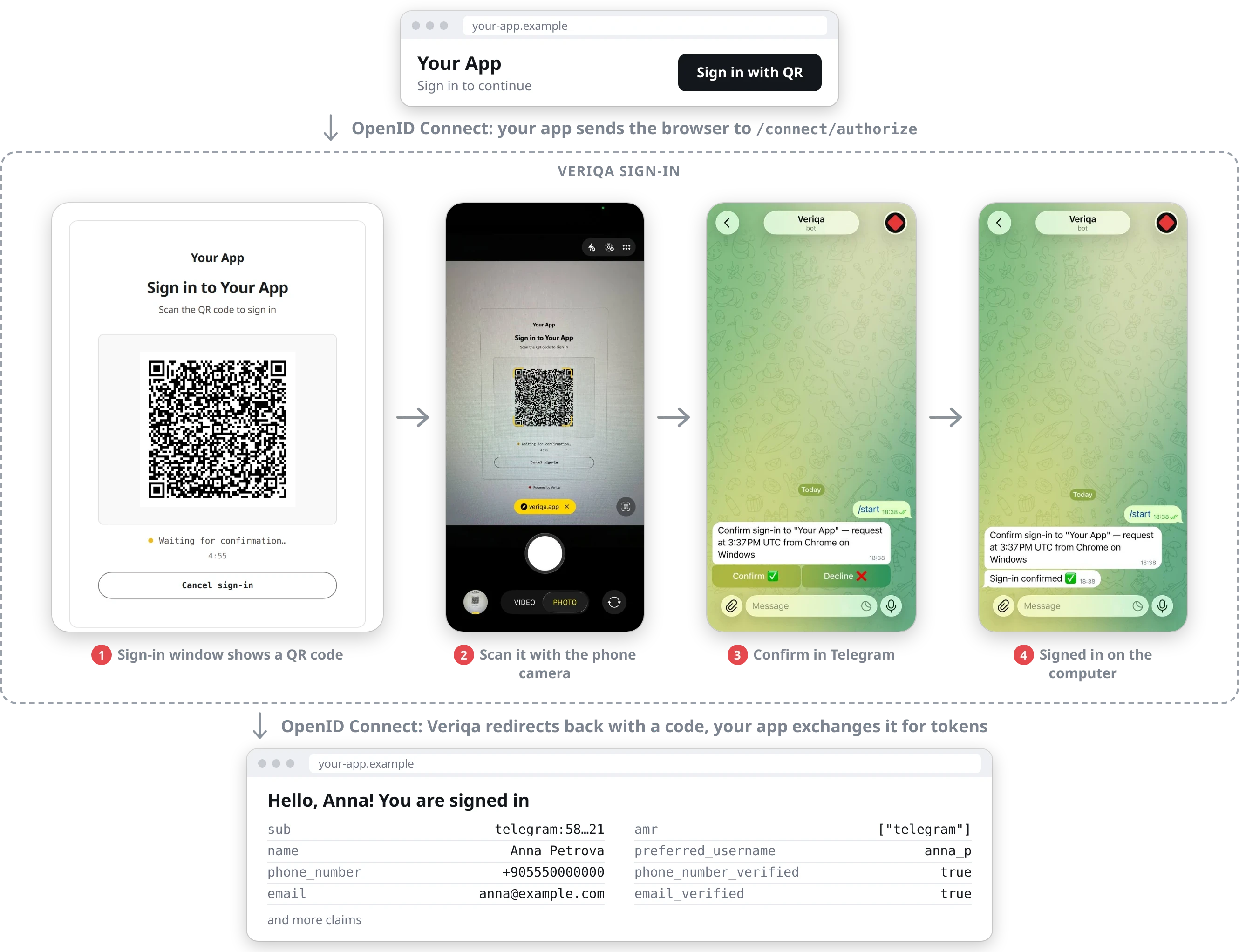
Your app starts the sign-in and gets ordinary OpenID Connect tokens back, whichever channel the user picked. In WhatsApp, the user first sends a ready-made message.
The gallery shows the screens channel by channel: signing in on a computer and on a phone, confirming an action, and the claims your app receives.
- Passwordless sign-in and sign-up. A new user signs up with the same action, with no form and no CAPTCHA.
- Second factor and confirmation of sensitive actions. Your product asks the user to confirm with one tap in their messaging app, with no code to type.
- Approving AI agent actions. Before an agent calls a tool, the request goes to the user's own messaging app, which the agent does not control.
- A live channel to the user. The same sign-in connects your product to the user's messaging app for notifications and confirmations.
- Standalone server in Docker: your application stays a plain OIDC client and needs no Veriqa package. Self-hosted quickstart
- OS service: the same server as a systemd unit or a Windows service, with neither Docker nor a .NET runtime. Install as an OS service
- NuGet connector: inside your ASP.NET Core host, on top of OpenIddict. .NET quickstart
Veriqa Cloud, the hosted version, opens soon. Until then, use the standalone server.
- veriqa: the product, its samples and its documentation entry point
- telegram-passwordless-login: a local sign-in demo with Telegram
- whatsapp-passwordless-login: the same with WhatsApp
- email-passwordless-login: the same with email
You can also try the live examples without installing anything.
The first public release came out on September 23, 2026. There has been no independent security audit yet. Read Known limitations and the sign-in risk comparison. Where you need phishing resistance by design, use passkeys.
Open source under MPL-2.0. Free for everyone, in production, at any company size — see LICENSING.md.
Website · Documentation · Gallery · Contact · Source code